

AI Customer Support (Voice Agent)
Overview
The Pelcro AI Voice Agent is a conversational phone assistant that answers your subscribers' calls on a dedicated number. Callers can ask about their account and complete common tasks — checking a balance, updating an address, cancelling a subscription — entirely over the phone, without waiting for a human agent.
It is powered by the same AI stack as the Pelcro AI Agent (Claude on Amazon Bedrock) and connects securely to your Pelcro account to identify callers, verify them, and act on their behalf in real time.
Note: The AI Voice Agent can be enabled by account owners only.
What Is It?
The AI Voice Agent is a dedicated phone line for your account, answered automatically by AI. When a subscriber calls, the agent identifies them by their phone number, verifies their identity with a one-time code, and then answers account questions or performs supported actions through the Pelcro API in real time.
It does not guess or fabricate information. Everything it reads back to a caller comes from a live lookup against your account, and every action a caller requests runs through the same API your dashboard uses.
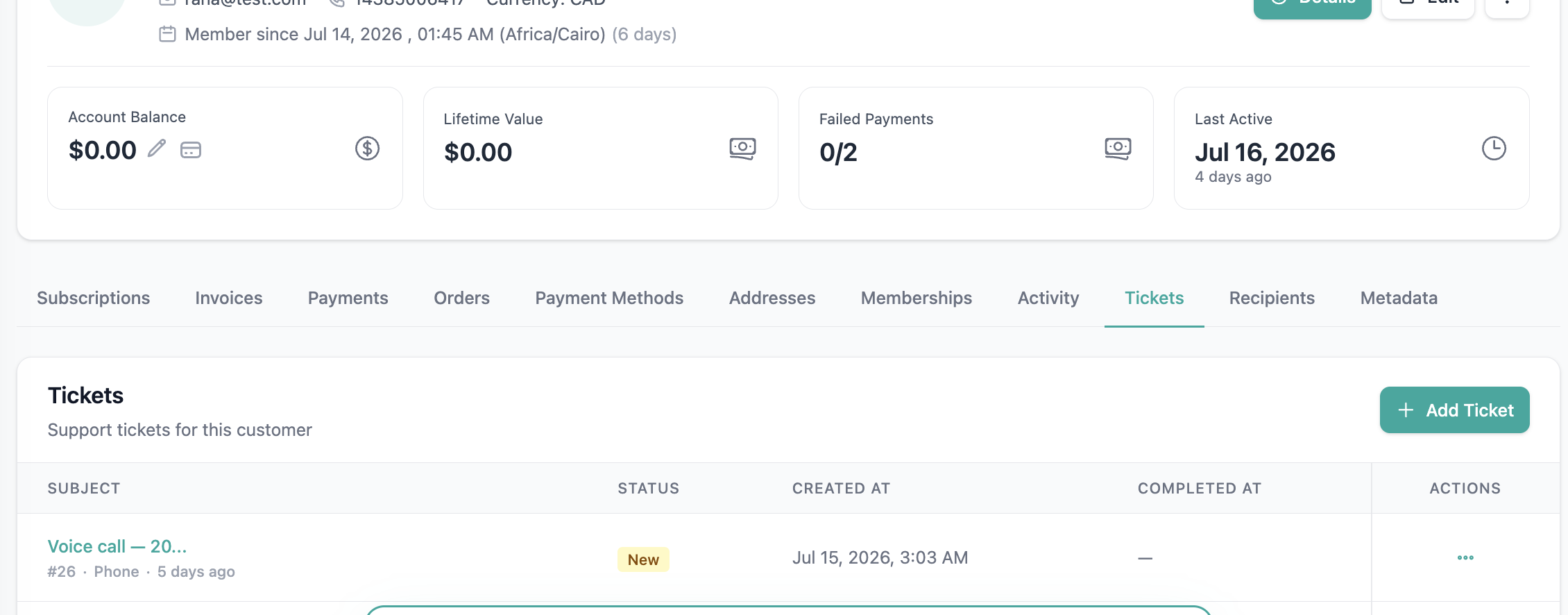
Every completed call is automatically saved as a support ticket, so your team has a searchable record of what was asked and done.
How to Enable It
- Go to Settings → Operations → AI Customer Support
- Follow the steps to provision a phone number — select a country and area, choose an available number from the list, and generate it
- Once the feature is enabled and the number is displayed, the AI Voice Agent is active
- Share the number with your subscribers — they can start calling and trying it out right away
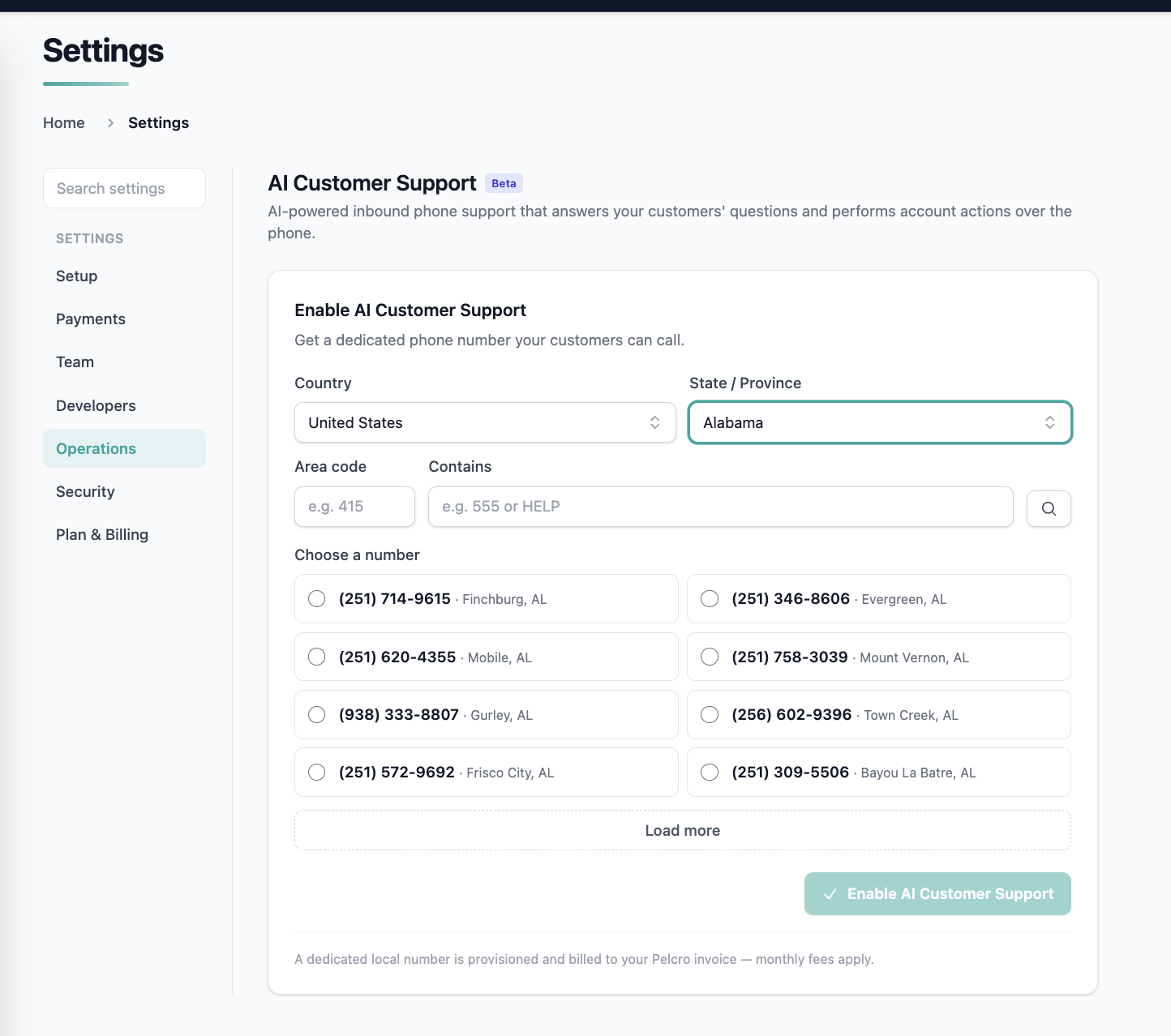
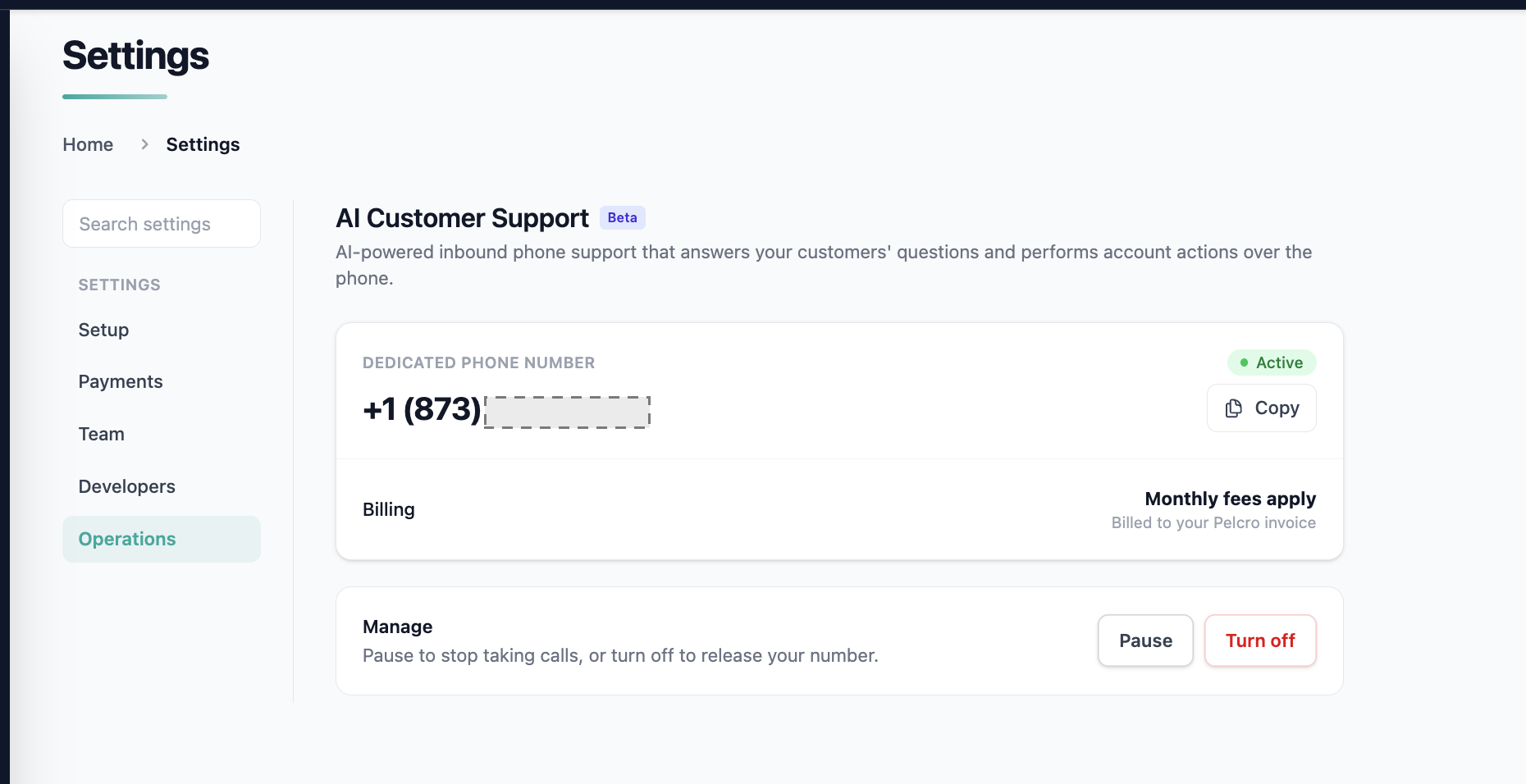
When the number appears in your settings, that means it has been generated and linked to your account. No further setup is required to begin taking calls.
How Does the Agent Work?
When a subscriber calls the number, the agent follows this flow:
- Receives the call — the call comes in on your dedicated number
- Identifies the caller — matches the caller's phone number against your account
- Verifies identity — sends a one-time code (OTP) to the phone via SMS; the caller enters it on their keypad
- Serves the request — once verified, the agent answers account questions or performs a supported action through the Pelcro API
- Logs the call — when the call ends, the transcript and call details are saved as a ticket linked to the caller's account
What Callers Can Do
Once a caller is verified, the agent supports the following:
Get account information
- Subscription status and renewal date
- Invoices — status, amount due, and due date
- Account balance
- Payment method on file (card brand and last 4 digits only)
Manage their details
- Create or update an address
- Update customer information (e.g. email and other profile details)
Cancel a subscription
- By default, a cancellation takes effect at the end of the current paid period, so the caller keeps access until it expires.
- To allow immediate cancellation, enable it on your account first: go to Settings → Payments → Billing, locate the cancel immediately option, and turn it on. Once enabled, the agent can cancel a subscription immediately when the caller explicitly asks for it.
If immediate cancellation is not enabled on your account, the agent will let the caller know it is unavailable and default to cancelling at the end of the paid period.
Adding a payment method
The agent can't take payment details directly over the phone. When a caller wants to add their payment method, it sends them a secure, one-time setup link by email instead.
- The caller opens the link and enters their new payment method on a Pelcro-hosted page — nothing is read aloud or entered during the call itself
- Once submitted, the new payment method is saved as the caller's default and used automatically for their active subscriptions
- The link is single-use and expires after a set time
Note: Availability may depend on your account's connected payment gateway — confirm with your account team if you're unsure whether this applies to your setup.
Reset a password
The agent doesn't change a caller's password directly. When a caller asks to reset it, the agent triggers a password reset email to the address on file — the caller completes the reset from that email, the same as requesting it from the website.
Report a missed delivery
Callers can report a missed delivery and request a redelivery directly over the phone, without waiting for a live agent.
- The agent identifies the caller's subscription that the missed delivery applies to.
- It checks that the subscription and delivery are eligible for a missed-delivery request.
- The caller confirms they want a redelivery, and gives a reason where one is required.
- The agent submits the request and confirms on the call that it was received.
Redelivery requests created by phone use the same missed-delivery workflow as Fulfillments. They appear in Pelcro the same way as a request your team creates directly, so your operations team can review and action them as usual.
When a Redelivery Can't Be RequestedIf the delivery isn't eligible for a redelivery, or the agent can't identify the caller's subscription or delivery, it tells the caller the request can't be completed. If Live Agent Fallback is enabled, the caller can be transferred to your support team.
Live Agent Fallback
If the AI Voice Agent can't resolve a caller's request, it can hand the call off to your live support team instead of ending the call.
When a Transfer Happens
The agent offers to transfer the caller to a live agent when:
- The caller explicitly asks to speak with a person
- The agent can't understand or resolve the request after a few attempts
- The caller asks for an action the agent doesn't support
Before transferring, the agent tells the caller they're being connected to a live agent. If the transfer can't go through — for example, the number is unavailable — the agent lets the caller know rather than dropping the call silently.
Setting It Up
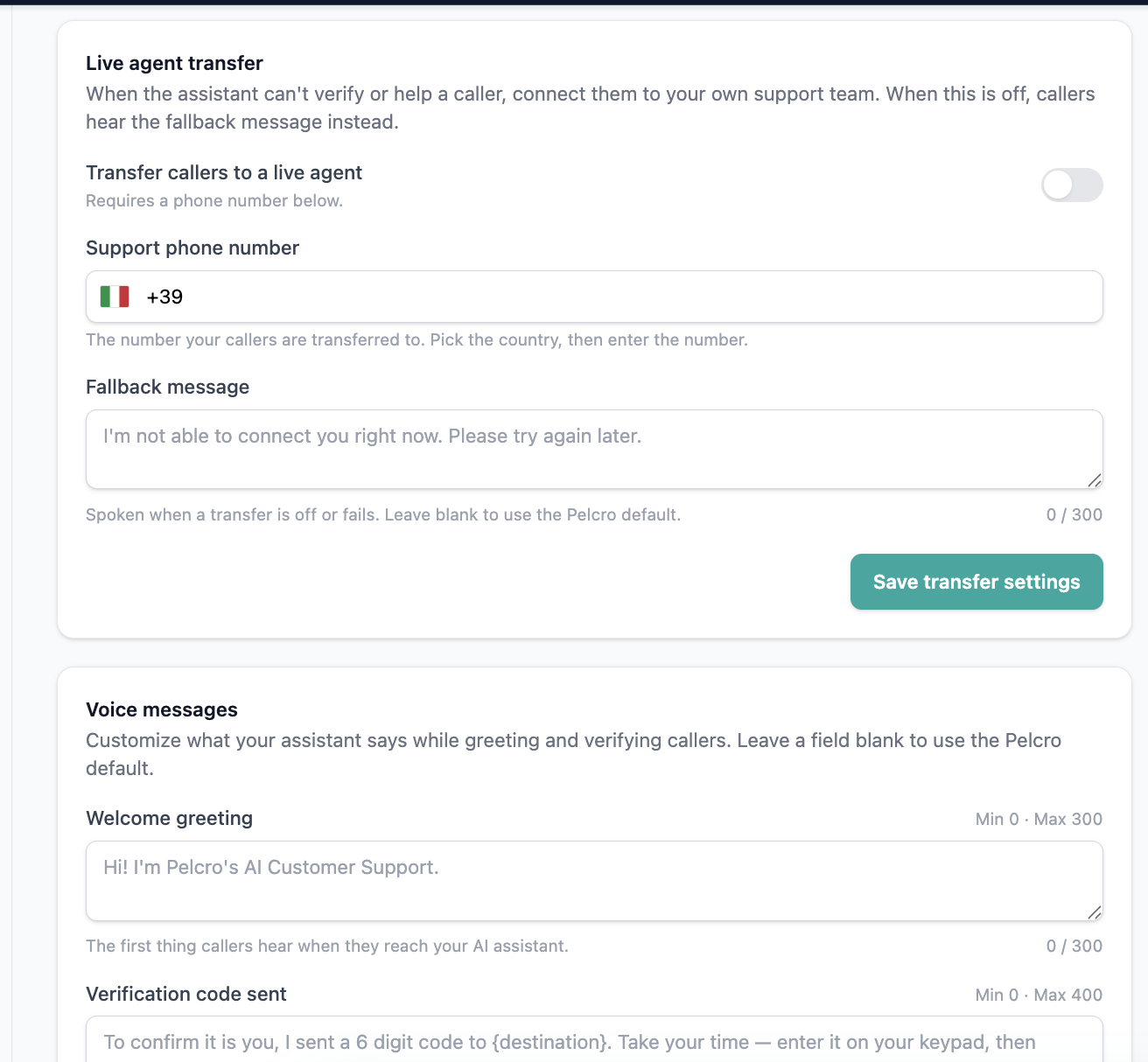
- Go to Settings → Operations → AI Customer Support
- Find the Live Agent Fallback section
- Turn on live-agent transfer and enter the phone number calls should be routed to
- The number is validated when you save it, and you can update or remove it at any time
Authentication & Security
Protecting your subscribers' accounts is central to how the voice agent works:
- Caller ID is a hint only. Recognizing the number a subscriber is calling from is never enough on its own — the agent always requires a one-time code before sharing any account information or taking any action.
- The code goes only to the contact on file. OTP is sent to the phone number, never to a number provided during the call.
- If the agent cannot confidently identify the caller, it ends the call (BETA).
Customizing Verification Messages
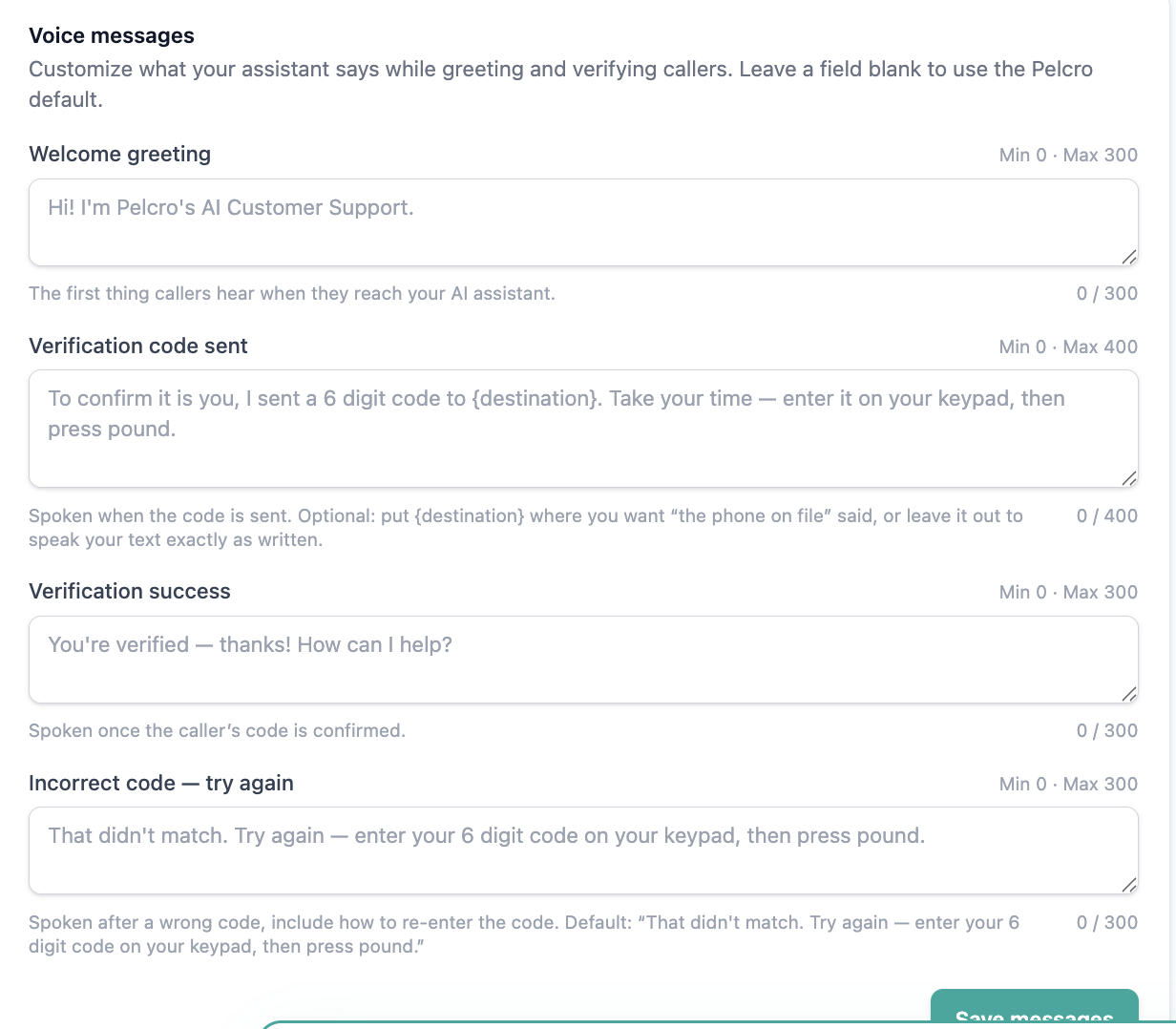
The wording the agent uses while verifying a caller's identity is configurable per account rather than fixed. You can adjust these verification and validation prompts under Settings → Operations → AI Customer Support to match your own voice and tone.
Call Transcripts & Tickets
When a call ends, the agent automatically creates a ticket so nothing is lost:
- The ticket includes the call transcript, customer details, call date and time, and a call reference.
- It is linked to the matching customer account when one is found.
- Duplicate tickets are prevented for the same call.
This means your support team always has a record to review and follow up on, even for fully self-served calls.
Availability & Beta Notes
- The AI Voice Agent is in beta and enabled by the account owner.
- We recommend testing the flow yourself first — call your own number and try a few requests before sharing it broadly with subscribers.
Limitations
- Verification is always required — callers must complete OTP before any account data is shared or action is taken.
- Supported actions only [BETA] —the agent handles account information, address changes, customer info updates, cancellations, payment method setup links, and password reset emails
- Immediate cancellation must be enabled — otherwise cancellations default to the end of the paid period.
- Full card details are never read aloud — only the card brand and last 4 digits are shared.
FAQ
How do subscribers reach the agent?
They call the dedicated phone number shown in Settings → Operations → AI Customer Support once the feature is enabled.
What happens if the agent can't help?
If Live Agent Fallback is enabled, the caller can be transferred to your support team. Otherwise, the agent lets them know it's unable to help with that request.
How does the agent know who is calling?
It matches the caller's phone number to your account and then confirms their identity with a one-time code before doing anything.
Can the agent cancel a subscription immediately?
Only if immediate cancellation is enabled on your account under Settings → Payments → Billing. Otherwise, cancellations take effect at the end of the current paid period.
Is every call recorded?
Every completed call is saved as a ticket with the transcript and call details, linked to the caller's account where possible.
Updated 12 days ago