

Renewal Summary Report
The Renewal Summary Report gives publishers a forward-looking view of upcoming subscription renewals — projected counts, renewal rates, and revenue — broken down by month, renewal type, and collection method. It replaces manual exports and ad hoc queries with a purpose-built report you can use to forecast cash flow and spot at-risk churn before renewal dates arrive.
Where to Find
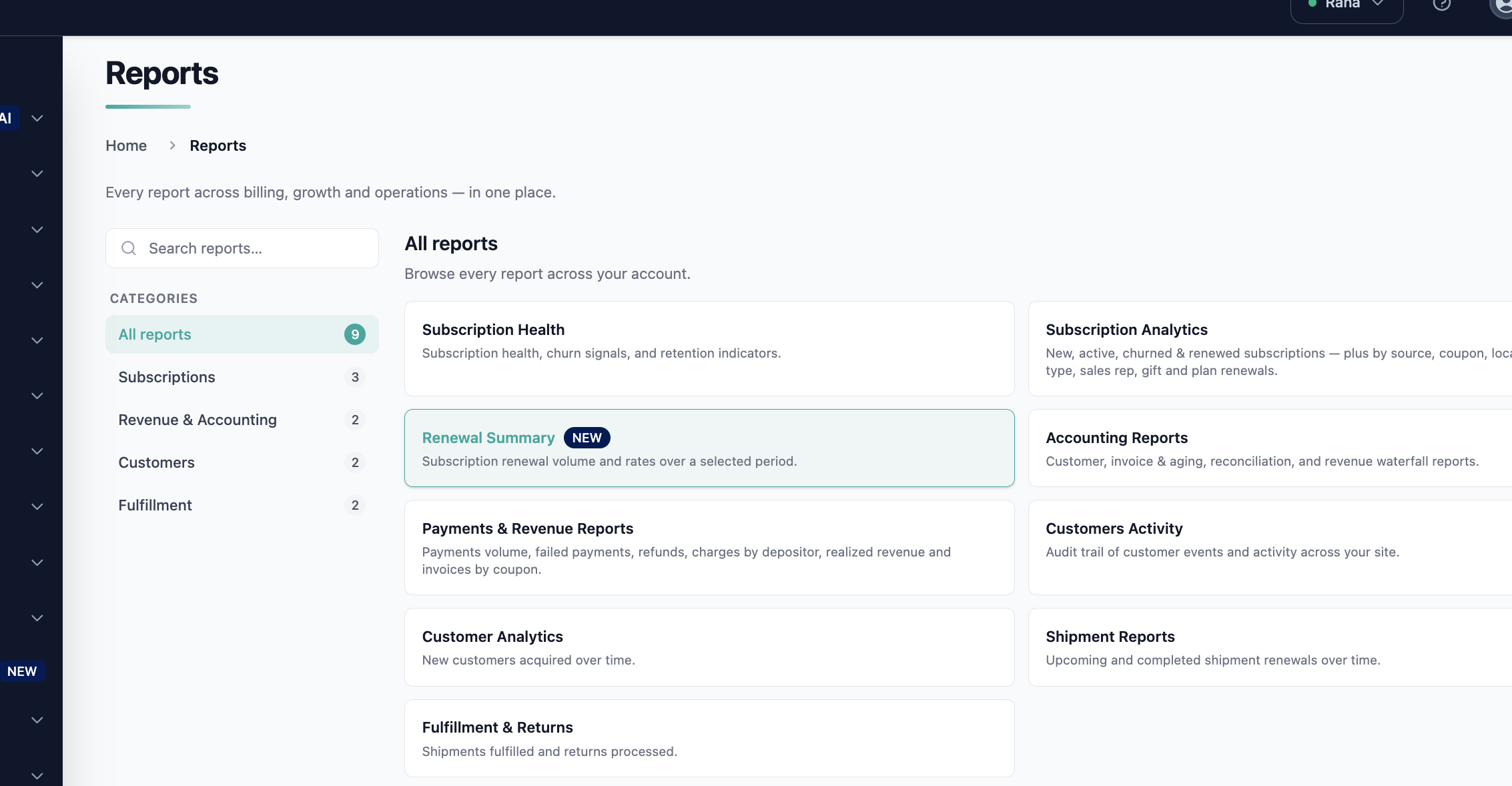
- Log in to the Pelcro Platform.
- Navigate to Reports → Subscriptions → Renewal Summary.
How it Works
The report analyzes every subscription with a renewal date falling inside the date range you select, then groups those subscriptions into monthly cohorts based on their renewal month.
For each monthly cohort, the report:
- Counts renewing subscriptions and splits them by renewal type (auto-renew vs. manual/self-renew) and by collection method (charge automatically vs. send invoice).
- Calculates projected renewal rates — overall, and separately for charge-automatically and send-invoice subscriptions.
- Projects renewal revenue, split by renewal type, and computes a Projected Total Estimated Revenue figure.
- Flags at-risk revenue where a subscription is projected to renew but its default payment method expires within the selected window.
- Categorizes subscriptions with no valid renewal path as Expected to Expire.
You can filter the report by Product Name to read renewals for a specific product, and export the full dataset to CSV for use in your own spreadsheet or BI tool.
Reading a Cohort
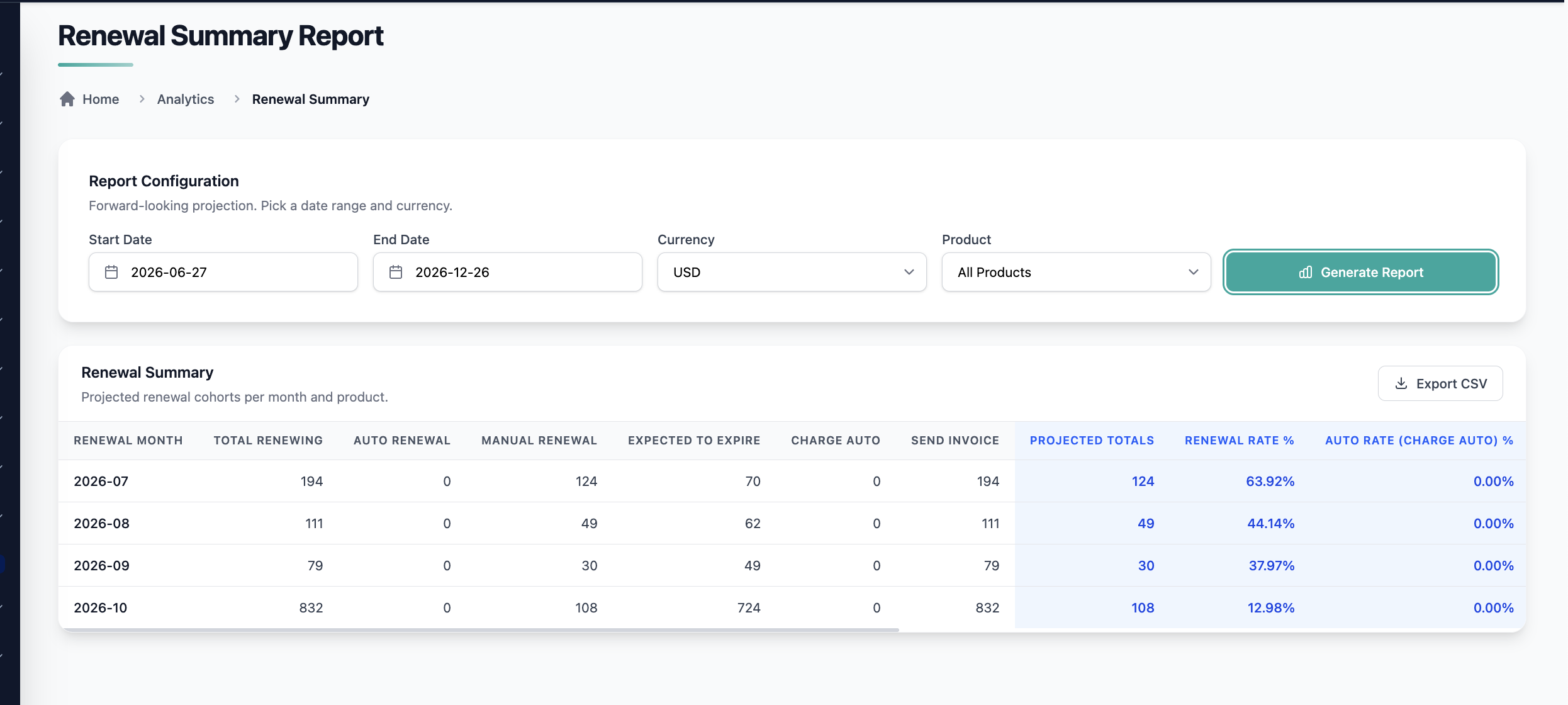
Each row represents one renewal month. The columns move left to right from raw counts, to derived rates, to projected revenue — so you can read a cohort as a story: how many renewals are coming, how likely they are to succeed, and how much revenue they represent.
How Subscriptions Are Categorized
Every subscription in the range falls into one of three buckets:
| Category | Condition | Where its revenue appears |
|---|---|---|
| Projected to renew | Auto-renewing, or manual with a scheduled renewal phase within the window | Projected Auto / Manual Renewal Revenue |
| At-risk (card expiry) | Projected to renew, but the default payment method expires within the window | At-Risk Revenue |
| Expected to Expire | Non-auto-renewing, or no scheduled renewal phase within the window | Expected to Expire Revenue |
Column Reference
The report presents the following columns for each monthly renewal cohort:
| # | Column | Definition |
|---|---|---|
| 1 | Renewal Month | Calendar month of the renewal date (MMM-YY) |
| 2 | Total Renewing Subscriptions | All subscriptions with a renewal date in the month |
| 3 | Auto Renewal Count | Subscriptions on plans set to auto-renew |
| 4 | Manual Renewal Count | Subscriptions on plans set to self-renew |
| 5 | Expected to Expire Count | Subscriptions expected to expire |
| 6 | Charge Auto Count | Subscriptions with collection method charge automatically |
| 7 | Send Invoice Count | Subscriptions with collection method send invoice |
| 8 | Projected Renewal Totals | Auto Renewal Count + Manual Renewal Count (Col 3 + Col 4) |
| 9 | Projected Renewal Rate | Projected Renewal Totals ÷ Total Renewing Subscriptions (Col 8 ÷ Col 2) |
| 10 | Projected Auto Renewal Rate for Charge Auto | Auto renewals ÷ Charge Auto Count (÷ Col 6) |
| 11 | Projected Manual Renewal Rate for Send Invoices | Manual renewals ÷ Send Invoice Count (÷ Col 7) |
| 12 | Projected Auto Renewal Revenue | Sum of revenue for renewing auto-renewal subscriptions |
| 13 | Projected Manual Renewal Revenue | Sum of revenue for renewing manual-renewal subscriptions |
| 14 | Expected to Expire Revenue | Sum of revenue for expected-to-expire subscriptions |
| 15 | Projected Total Estimated Revenue | Projected Auto Renewal Revenue + Projected Manual Renewal Revenue (Col 12 + Col 13; excludes Col 14) |
| 16 | At-Risk Revenue | Sum of revenue for subscriptions projected to renew whose default payment method expires within the selected window |
Rules and Limitations
- Forward-looking only. The report projects upcoming renewals within the selected range. Historical actuals are not included.
- Payment-method risk uses expiry date only. At-Risk Revenue is based on the stored expiry date of the default payment method — not a real-time check with the card issuer.
- Revenue projections exclude refunds and mid-cycle plan changes.
- Monthly granularity. Cohorts are grouped by month within the selected range.
Real-World Examples
Example 1 — Forecasting Next Quarter's Cash Flow
A publisher wants to project revenue for the upcoming quarter. They open the Renewal Summary Report, select the next three months as the date range, and read Projected Total Estimated Revenue across the three monthly cohorts. Because auto and manual renewals are split out, finance can weight the manual (send-invoice) portion more conservatively, since those depend on customer action.
Example 2 — Comparing Renewal Performance by Product
A product manager wants to see which product renews best. They apply the Product Name filter to view each product's cohorts individually, then compare the Projected Renewal Rate across products to inform pricing and packaging decisions.
What it Does Not Do
- Does not report historical renewals — it is forward-looking only; use accounting reports and exports for past actuals.
- Does not guarantee renewals will occur — figures are projections based on renewal type, collection method, and scheduled phases, not confirmed outcomes.
Updated 4 months ago