

Accounting Reports
Pelcro provides an Accounting Reports section that helps you review customer's activity and reconcile transactions over specific time periods. You can locate these reports from Accounting > Reports.
Customer Summary Balance Report
The Customer Summary Balance Report includes customers who have transaction activity within the selected reporting period, providing a summary of their current balance, balance as of a chosen date, and the summation of all transactions that occurred within the specified reporting period.
This report helps finance teams verify ledger accuracy and perform month-end or audit reconciliations.
Main Report Fields
| Field Name | Definition | Example |
|---|---|---|
| Current Ending Balance | The customer’s balance as of the time the data is downloaded. This reflects the most up-to-date amount currently shown in the system. | If the customer’s balance is 900 at the time you download the data, the current ending balance will be 900. |
| Ending Balance as of [Selected Date] | The customer’s balance as of the end of the selected reporting period. It excludes any transactions that occurred after that date. | If the selected period ends on 1 August and the balance at that date was 900, the ending balance as of that date is 900. |
| Balance Transactions Summation | The total value of all transactions (payments, adjustments, etc.) that occurred within the selected date range. | If the customer’s balance was 1000 at the start of July, and a 100 transaction occurred during August, then the transaction summation for the selected August period is 100. |
Example Scenario
| Field | Value | Explanation |
|---|---|---|
| Balance as of June | 1000 | Opening balance at the start of the reporting period. |
| Transaction Applied (July) | 100 | Applied balance to invoice in July. |
| Report Selected Period | 1 July – 1 August | Reporting range selected by the user. |
Calculated Report Output:
| Field | Value | Explanation |
|---|---|---|
| Current Ending Balance | 900 | Current balance as of the time of report download. |
| Ending Balance as of Selected Period | 900 | Balance at the end of the selected period (1 August). |
| Balance Transactions Summation | 100 | Total transactions applied during July. |
How It Works
- The report aggregates all customer balance transactions (invoices, payments, refunds, and adjustments).
- For each customer, it computes:
- The balance at the start of the selected period
- The total movement (sum of transactions) during the specified period
- The ending balance as of the selected period’s end date
- When the report is downloaded, Pelcro recalculates the Current Ending Balance to reflect the most recent activity in the system.
Use Cases
- Month-end or quarterly reconciliation
- Customer balance verification before billing runs
- Audit reviews and balance movement tracking
Accounts Receivable (AR) Aging Report
The AR Aging Report provides a complete snapshot of all open invoice balances and categorizes them into industry-standard aging buckets (0–30, 31–60, etc.) based on a selected As of Date.
This report is essential for finance, accounting, and collections teams who need to monitor overdue invoices, forecast cash flow, and perform accurate reconciliation.
Overview
The AR Aging Report allows you to:
- View all open invoices as of a chosen cutoff date.
- Understand how overdue each invoice is based on aging buckets.
- Analyze invoice-level financial data along with related subscription, customer, and plan metadata.
- Support collection workflows, audit needs, and financial statement alignment.
All aging values are calculated relative to a single As of Date, which follows standard accounting practice.
As of Date Logic
The As of Date determines:
- Which invoices appear in the report (only invoices created on or before this date and still open as of that date).
- How the aging buckets are calculated.
- Which balances are considered overdue or not yet due.
If an invoice has no due date, the system will automatically use the invoice creation date for aging calculations.
Aging Buckets
Every open invoice is categorized into one of the following buckets:
- Not Yet Due
- 1–30 Days Past Due
- 31–60 Days Past Due
- 61–90 Days Past Due
- 91–120 Days Past Due
- Over 120 Days Past Due
The sum of all these buckets equals the invoice’s Accounts Receivable balance.
Report Fields
Each row in the report includes detailed invoice, customer, subscription, and plan information:
Invoice Details
- Invoice ID
- Invoice Number
- Invoice Created At
- Invoice Status
- Invoice Total
- Due Date
- Accounts Receivable
- All aging bucket values (Not Yet Due → Over 120 Days)
Subscription Details
- Subscription Created At
- Subscription Started At
- Subscription Period Start
- Subscription Period End
- Subscription Status
Customer Details
- Customer ID
- First/Last Name
- Customer Title
- Customer Organization
Product & Plan Details
- Product Name
- Plan ID
- Plan Name
- Plan Term
- Plan Amount
- Plan Auto Uncollectible Days (Used to compute time remaining before the invoice becomes uncollectible)
- Sales Rep Name associated with the subscription
How It Works
For each invoice:
- Confirm it is open as of the selected As of Date.
- Determine the correct aging bucket based on the Due Date.
- If no Due Date exists, fallback to Invoice Created Date.
- Calculate Accounts Receivable as the sum of all aging buckets.
- Combine the invoice details with related subscription, customer, and plan metadata.
Only open invoices with outstanding balances are included.
Use Cases
- Tracking overdue customer balances
- Collections follow-up and prioritization
- Cash flow forecasting
- Month-end and quarter-end reconciliation
- Audit support and financial statement tie-outs
- Monitoring trends in aging to identify risk accounts
Revenue Waterfall Report
Overview
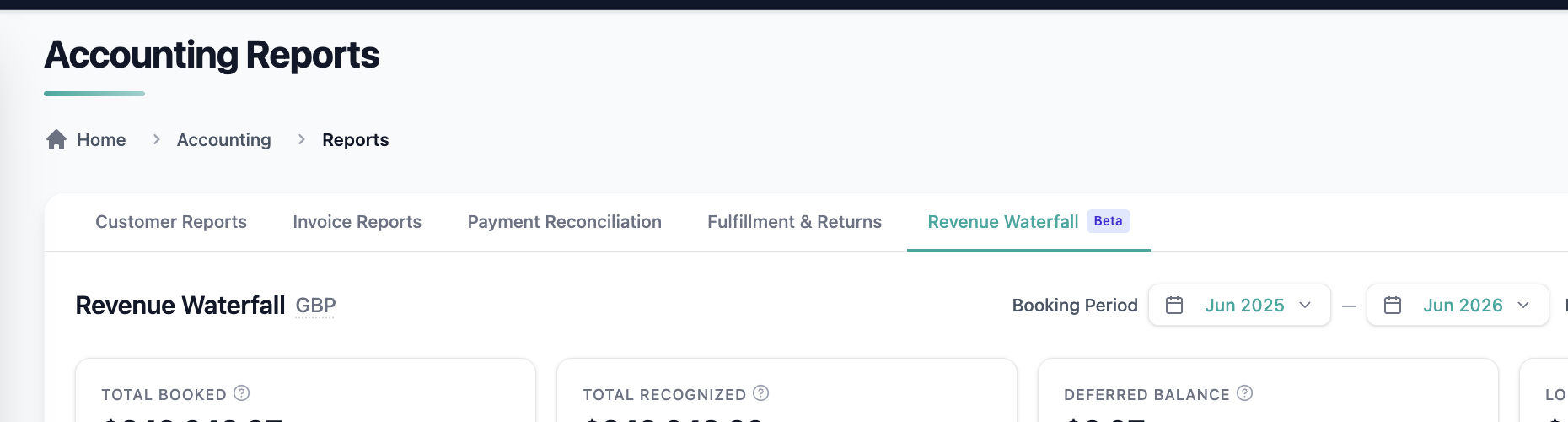
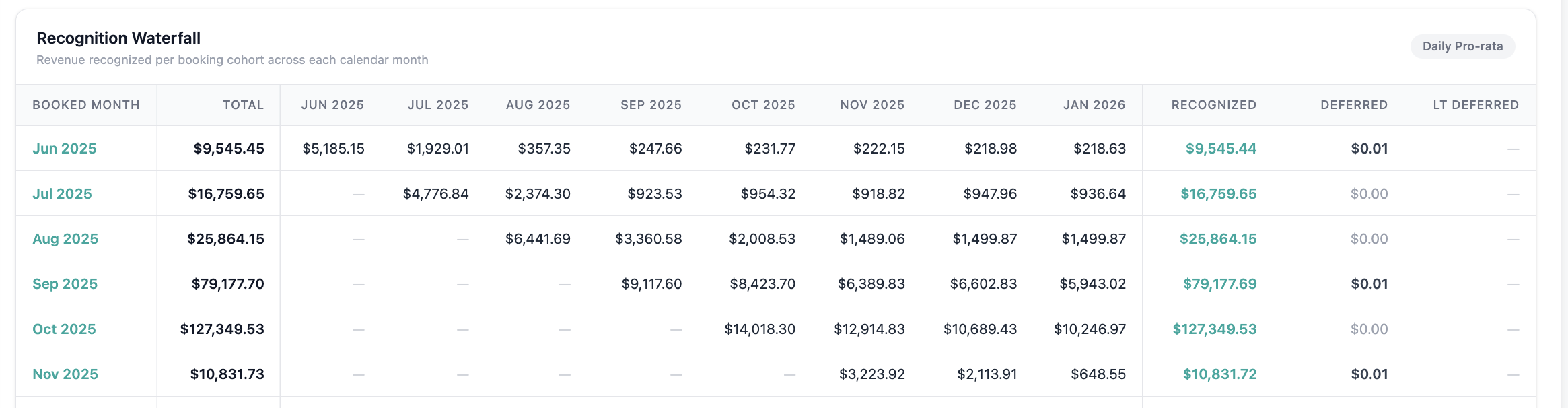
The Revenue Waterfall Report shows how deferred balances from already-issued invoices will be recognized as revenue across future periods. It will give finance teams a transparent, period-by-period view of how booked revenue flows into recognized revenue over time.
This report is designed for finance, accounting, and product stakeholders who need to forecast revenue recognition, validate deferred balances, and reconcile against Stripe.
Where to Find the Report
Navigate to:
Reports → Revenue Waterfall
How It Works
1. Select a date range to define the waterfall periods.
2. Pelcro generates the report using only already-issued invoices — future billing projections are not included.
3. Revenue is allocated across periods using the existing per-day or per-period recognition rules.
4. Deferred balances roll forward correctly between periods.
5. Monthly totals reconcile mathematically across the full waterfall.
Report Columns
Each period row in the waterfall includes the following:
| Column | Definition |
|---|---|
| Period | The calendar month being reported on. |
| Opening Deferred Balance | The unrecognized revenue balance carried into the period from prior invoices. |
| Invoiced (Booked) Amount | The total amount invoiced during the period. |
| Recognized Revenue | The portion of deferred balance recognized as revenue during the period, based on recognition rules. |
| Closing Deferred Balance | The remaining unrecognized balance at the end of the period. Rolls forward as the next period's opening balance. |
Drill-Down
Each period row can be expanded to view:
- Subscription-level breakdown of recognized and deferred amounts.
- Invoice-level detail for full auditability.
Use Cases
- Revenue forecasting and period-end close
- Audit support and revenue recognition traceability
- Finance team sign-off on recognized vs. deferred splits
Notes
- The report is generated from already-issued invoices only. Revenue from invoices not yet created is out of scope.
- Recognition logic follows the same per-day or per-period rules applied across the rest of the Pelcro accounting module.
Payment Reconciliation Report
Overview
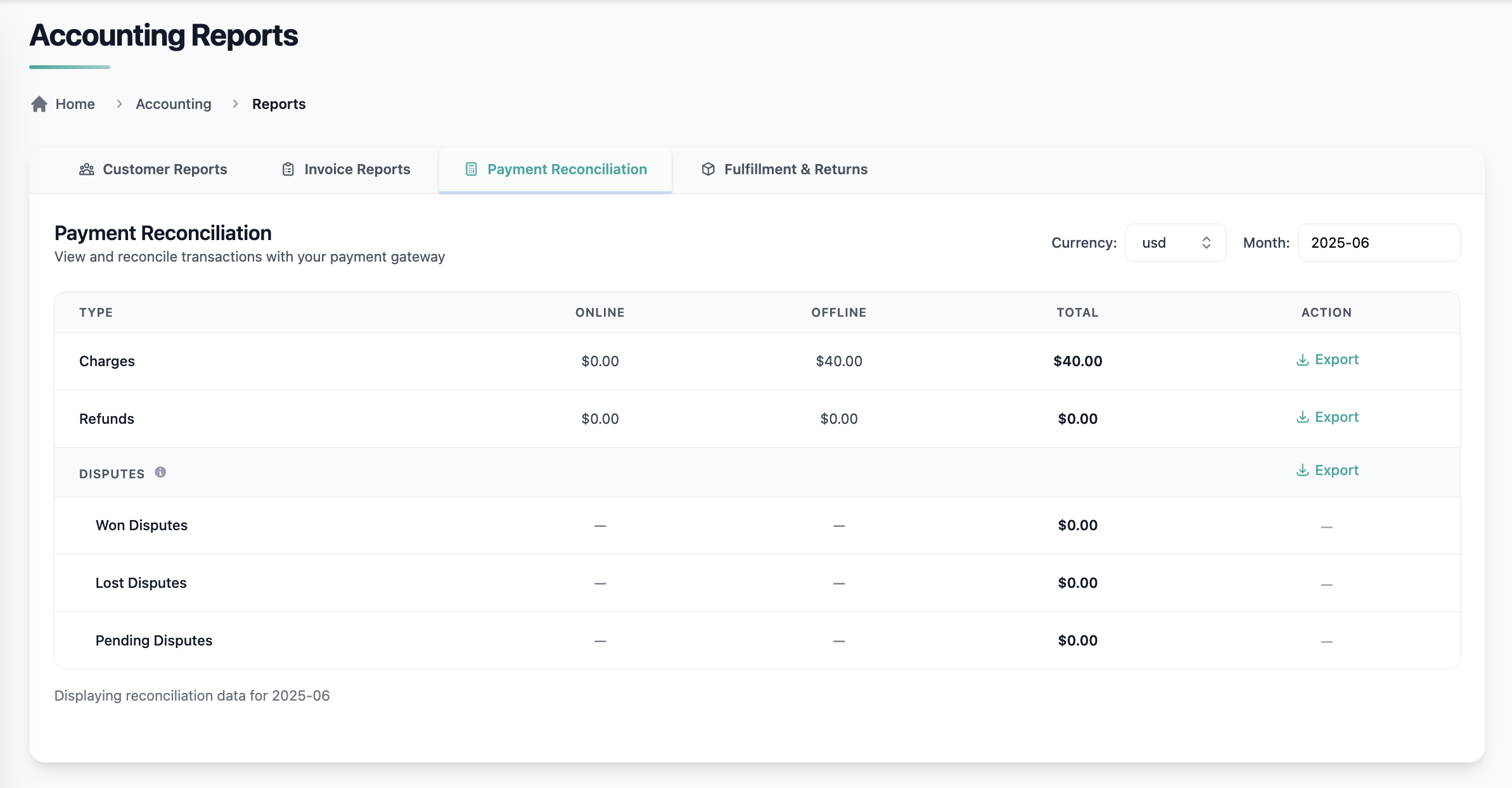
The Payment Reconciliation Report helps finance teams quickly reconcile Pelcro transactions with their payment processor’s monthly summaries. It provides a clean, one-to-one view of payments, refunds, and disputes, eliminating the need for manual adjustments and reducing reconciliation errors.
This report is designed to match processor data exactly, making month-end close and audits faster and more reliable.
Where to Find the Report
Navigate to:
Reports → Payment Reconciliation
How It Works
- Select a Month using the monthly selector (YYYY-MM).
- Choose the Currency you want to review.
- Pelcro generates a simple, structured table summarizing all activity for that month.
The report reflects Pelcro’s existing online vs. offline payment classification, ensuring consistency with other accounting views.
Report Layout
The table contains three rows:
- Payments (Payments received)
- Refunds
- Disputes
-
Won Disputes
Disputes resolved in your favor, where funds are retained. -
Lost Disputes
Disputes resolved against you, resulting in refunds. -
Pending Disputes
Disputes that are still in progress and not yet finalized.
-
Each row includes the following columns:
- Online Total
- Offline Total
- Total
- Export
There is no revenue recognition or graphical logic — the report is intentionally straightforward for reconciliation purposes.
Exporting Data
- Each row includes an Export button that downloads a CSV file containing the currently displayed data.
- All data is grouped by the selected month and currency to align directly with processor summaries.
Use Cases
- Monthly payment processor reconciliation
- Validation of charges, refunds, and disputes
- Faster month-end close
- Audit preparation and financial controls
Notes
- Only data for the selected month and currency is included.
- The report is designed for exact matching, not forecasting or revenue analysis.
- Online vs. offline classification follows Pelcro’s existing payment source logic.
Shipments & Returns Report
Overview
The Shipments & Returns Report helps finance teams review shipment and return activity based on actual fulfillment creation dates, enabling accurate revenue recognition for the correct period.
This report exports a ZIP file containing two detailed CSV files: one for shipments and one for returns.
Where to Find the Report
Navigate to:
Reports → Shipments & Returns
How It Works
- Select a Fulfillment Creation Date range (from / to).
- Pelcro generates a ZIP containing:
- Shipments CSV — All shipments fulfilled within the selected date range.
- Returns CSV — All returns tied to fulfillments created within the same date range.
Report Structure
Shipments Sheet
- Based on the existing Fulfillment Export dataset.
- Includes all fulfillment fields with shipment-specific fields such as:
- Fulfillment creation date
- Shipment quantities
- Unit rate and totals
Returns Sheet
- A dedicated returns dataset.
- Includes per-return fields such as:
customer_namecustomer_idreturn_created_atreturn_quantityreturn_ratetotal
Use Cases
- Accurate monthly or period-based revenue recognition
- Shipment and return activity review
- Audit preparation and reconciliation
Notes
- The selected date range applies to both shipments and returns based on the fulfillment’s created-at date.
- Data is exported in CSV format inside a ZIP for easy download and analysis.
Next Steps:
- Learn more about Accounting
- Contact [email protected] for questions about report data.
Updated about 1 month ago