
Address Cleansing
Category
Explanation — Understand how Pelcro validates, standardizes, and enriches U.S. mailing addresses using USPS-certified processes.
Overview
Pelcro’s Address Cleansing feature uses CASS-certified software and USPS methodologies to automatically validate and standardize shipping addresses within the United States.
This process helps you:
- Ensure accurate mail delivery
- Reduce returned or undeliverable mail
- Qualify for USPS automation discounts
- Improve address data quality and prevent mailing errors
AvailabilityAddress cleansing currently supports U.S. addresses only.
Supporting additional countries (e.g., Canada) would require separate certification and implementation.
What Is Address Cleansing?
Address cleansing is a multi-step process that improves address accuracy and ensures compliance with USPS formatting and validation standards.
The process includes:
- Address parsing
- Address standardization
- Address correction
- Address validation
- Address enrichment
Address Parsing
Address parsing breaks a raw address string into structured components so Pelcro can analyze and validate each element individually.
Typical components include:
- Primary number
- Street pre-directional
- Street name
- Street suffix
- Street post-directional
- Secondary unit designator and number
- City, state, and ZIP Code™
Parsing enables accurate correction, normalization, and validation in later stages.
Address Standardization
Parsed address components are formatted according to USPS® Publication 28 standards.
This includes:
- Applying USPS abbreviations (e.g., Street → ST)
- Proper capitalization
- Correct ordering of address elements
- Applying ZIP+4® formatting

Address Correction
Pelcro compares address data against USPS reference datasets to detect and fix issues such as:
- Misspelled street or city names
- Incorrect suffixes or directionals
- Incomplete or invalid addresses
- Recoverable formatting errors through intelligent matching
Address Validation
Validation confirms that an address represents a real, deliverable USPS destination.
This process goes beyond formatting checks and verifies:
- Existence — Does the address exist?
- Deliverability — Can USPS deliver mail there?
- Delivery Point Validation (DPV®) — Confirms delivery at the unit or apartment level.
Address Enrichment Attributes
CASS-certified processing enhances addresses with additional USPS data used for delivery optimization, reporting, and postage qualification.
ZIP+4® Code
What it is: A 5-digit ZIP Code plus a 4-digit extension.
Purpose: Improves geographic precision and delivery accuracy.
Delivery Point Code (DPC)
What it is: A 2-digit delivery identifier plus a validation digit.
Purpose: Creates a unique 11-digit delivery-point identifier for barcode sorting.
Carrier Route Code
What it is: Mail route identifier (e.g., C023, R015, H001).
Purpose: Enables carrier-route postage discounts.
USPS eLOT® Code
What it is: Line-of-travel sequencing indicator.
Purpose: Allows mail sorting in carrier delivery order.
DPV® Status
What it is: Deliverability confirmation code (Y, N, S, D, etc.).
Purpose: Reduces undeliverable mail and improves list hygiene.
County Name & FIPS Code
Purpose: Geographic reporting, demographic analysis, and data integration.
Congressional District
Purpose: Geographic segmentation for political or regional communications.
How Address Cleansing Works in Pelcro
Address cleansing runs automatically when an address is created or updated. No manual trigger is required.
Trigger sources
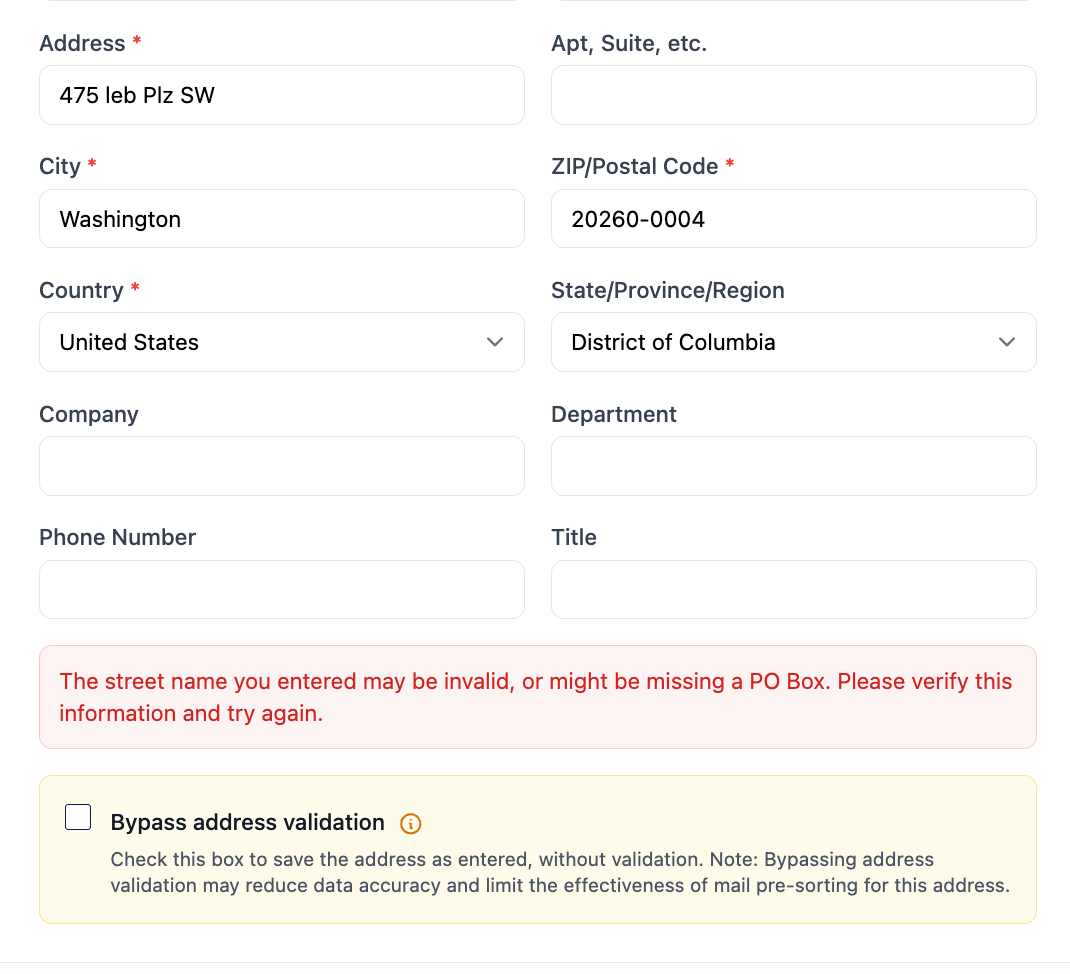
Cleansing is triggered when you submit an address through any of these channels:
What happens during processing
- Pelcro parses and standardizes the address against USPS® Publication 28 rules.
- The address is matched against USPS reference datasets to correct errors (misspellings, wrong suffixes, etc.).
- Validation confirms the address is a real, deliverable USPS destination.
- Enrichment data (ZIP+4, carrier route, DPV® status) is appended automatically.
- The cleansed address becomes eligible for USPS presorting and automation discounts.
Processing outcomes
| Outcome | Description |
|---|---|
| Valid address | Address is standardized, enriched, and saved. |
| Corrected address | Pelcro suggests a corrected version of the address. |
| Invalid address | A validation error is returned with details about the issue. |
Troubleshooting
Address not found or invalid
The address could not be matched to a valid USPS destination. Verify that:
- The street number and name are correct.
- The city and state match the ZIP Code.
- The address exists and is deliverable by USPS.
Partial match or suggested correction
Pelcro found a close match but the original input had errors. Review the suggested correction and confirm or update the address with the corrected values.
Address cleansing not running
Address cleansing must be enabled on your account. If addresses are saved without standardization or enrichment, contact [email protected] to verify the feature is active.
Next Steps
Submit addresses through the Open API and receive cleansed results.
Use the Core API to create and validate addresses programmatically.
To enable Address Cleansing on your account, contact [email protected].
Updated about 1 month ago