

AI Billing Agent
Overview
The Pelcro AI Billing Agent is an intelligent billing assistant built into your publisher dashboard. Create subscription plans in plain English, define pricing rules conversationally, and let the agent handle every billing cycle automatically — no manual configuration, no formulas, no guesswork.
It is powered by an AI orchestration layer with direct access to your Pelcro account — plans, subscriptions, invoices, shipments, and billing cycles.
What Is It?
The AI Billing Agent has two connected functions:
1. AI Plan Creation — A conversational chat panel that lets you build a subscription plan by describing it in plain language. As you chat, the plan configuration updates in real time on the left side of the screen. No forms, no dropdowns — just describe what you want.
2. AI-Controlled Billing — Once a subscriber is on an AI Plan, the agent takes over the entire billing lifecycle. It reads your pricing rules, calculates the correct amount for each cycle, handles step-up pricing, processes shipment-based billing, and synchronizes billing periods automatically.
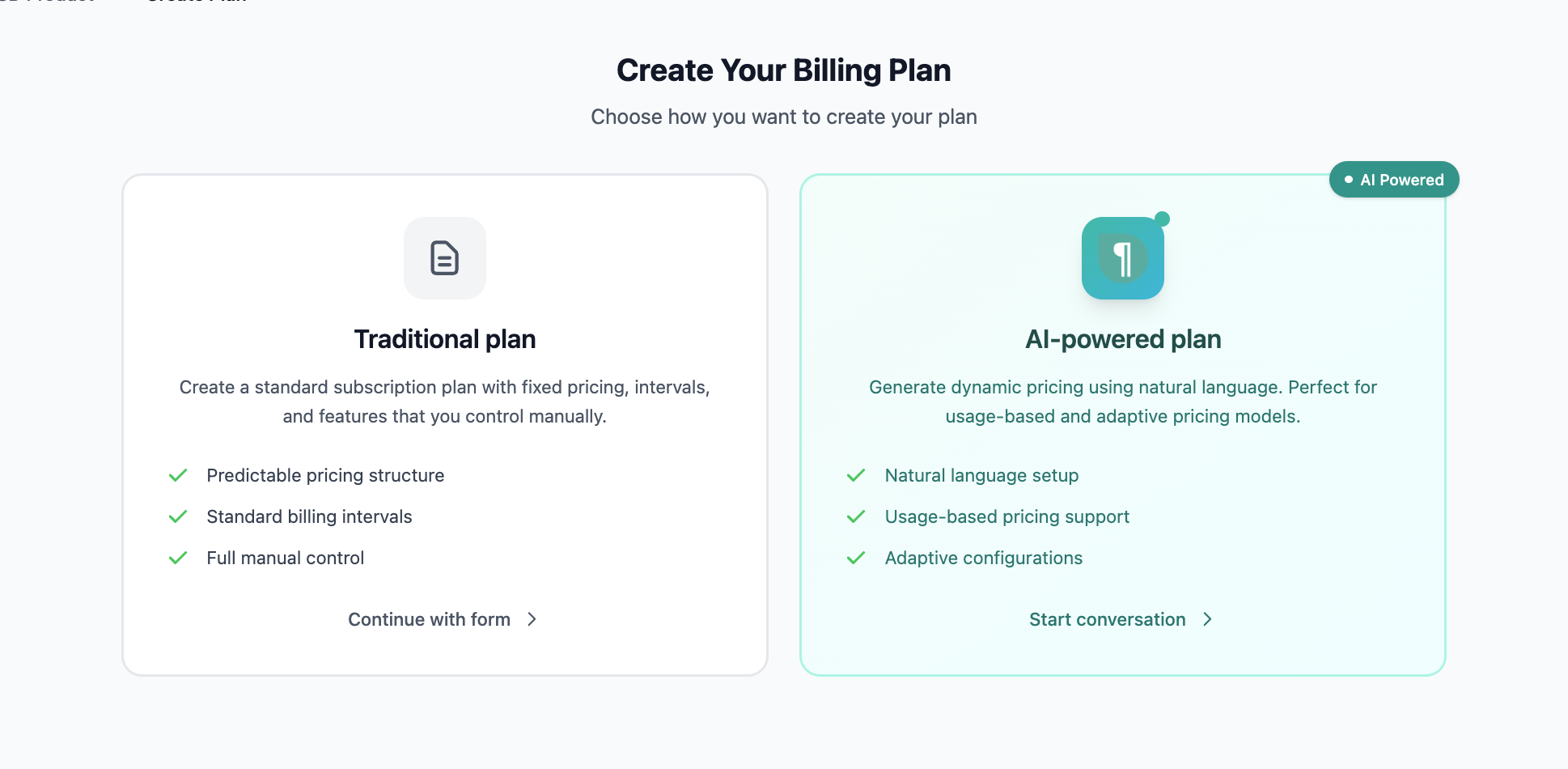
How to Create an AI Plan
- Navigate to Plans in your Pelcro dashboard
- Click Create AI Plan
- The AI Plan Assistant panel opens on the right — your live plan configuration appears on the left
- Type your plan specifications in plain language, or choose a Quick Start option
- The assistant asks follow-up questions to fill in any missing details
- Review the auto-populated configuration on the left as it updates
- Confirm to save the plan
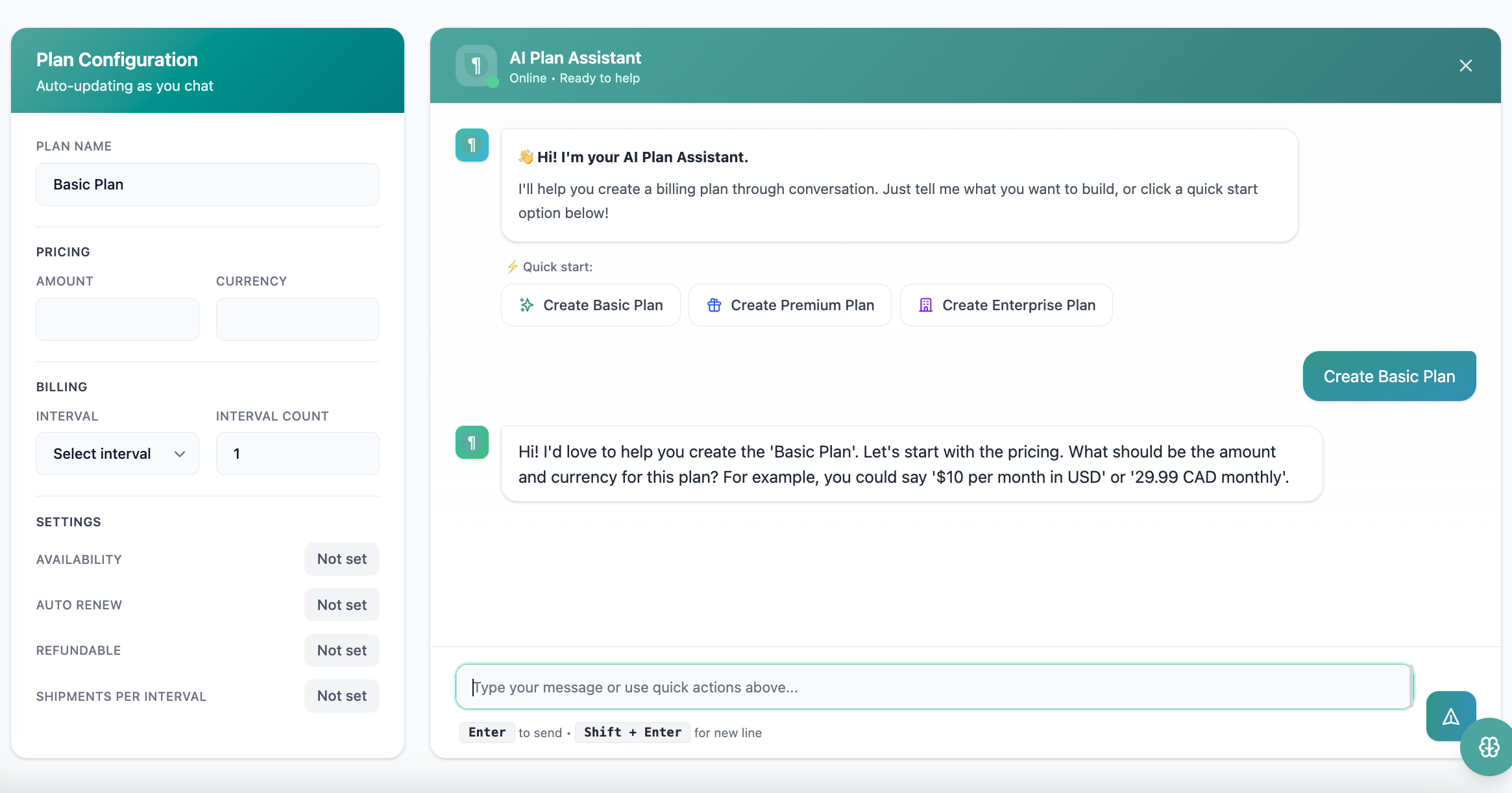
You can say things like "$10 per month in USD, auto-renewing, refundable" or "Carrier commission $0.37 per copy with a dealer price of $0.70" — the agent extracts and maps every detail automatically.
Quick start options:
- ⚡ Create Basic Plan
- 🎁 Create Premium Plan
- 🏢 Create Enterprise Plan
How Does the Billing Agent Work?
Once a subscriber is on an AI Plan, every renewal is handled automatically by the agent. Here is the pipeline it follows on each billing cycle:
Step 1 — Routing & Classification
The agent reads the billing_type to determine the correct billing path:
- Receivable → Charges the customer via the Invoice Customer Agent
- Payable → Pays the vendor via the Office-Pay-Bills Agent
Step 2 — Pricing Rule Parsing
The agent scans your plan's natural-language pricing rules to extract:
- Rate identification — distinguishes plan prices (invoices) from Vendor commissions (bills)
- Step-up detection — identifies whether a price increase applies:
- Time-based: triggered by keywords like "every 6 months"
- Cycle-based: triggered per renewal (e.g., "each renewal")
- Rate type — fixed amount or percentage (percentages default to compounded growth)
Step 3 — Shipment & Return Processing
If the plan includes shipment data, the agent switches to per-unit pricing instead of a flat fee:
- Only shipments with an
approved_attimestamp are processed - Shipment day (
week_dayorcreated.date) is matched against day-specific rates in your rules - Return deductions (e.g., "-$0.50 per return") are calculated and subtracted from the total
Step 4 — Amount Calculation
The agent calculates the final amount based on the current billing cycle:
Step 5 — Billing Period Synchronization
The agent calculates the exact timestamps for the next cycle:
- New start — set to the current
subscription.current_period_end - New end — calculated by adding the
plan.intervalto the new start date - All dates output in
YYYY-MM-DD HH:MM:SSUTC format
What Triggers the Billing Agent?
The agent is triggered automatically on each subscription renewal for any subscription on an AI Plan. No manual action is required.
Three internal data points drive its logic on each trigger:
| Trigger | Description |
|---|---|
billing_type | Primary router — "Receivable" triggers the Invoice Agent; "Payable" triggers the Pay-Bills Agent |
approved_at (shipment) | If present on a shipment record, activates per-unit shipment pricing, overriding the flat plan amount |
pricing_rules content | Keywords like "anniversary", "increase by", or "per copy" activate step-up formulas or per-unit logic |
What You Can Ask the AI Plan Assistant
Create a standard plan
"Create a monthly plan at $29.99 USD that auto-renews and is refundable."
Set up step-up pricing
"Charge $1,500 CAD per month, increasing by 3% on each renewal."
Define shipment-based billing
"Bill $3 CAD per shipment delivered on Thursdays, and $1 CAD for Fridays."
Configure carrier/dealer plans
"Carrier commission $0.37 per copy. Dealer price $0.70 per copy."
Set billing intervals
"Bill every 6 months in GBP with no auto-renewal."
Input & Output Format
Input (Plan Creation)
Plain natural language — no structured format required. The assistant extracts all plan fields from your conversation, including:
- Plan name, amount, currency
- Billing interval and interval count
- Auto-renew, refundable, availability settings
- Pricing rules (step-up logic, shipment rates, carrier/dealer splits)
- Shipments per interval
Input
{
  "plan": {
    "id": "integer | string",
    "nickname": "string",
    "amount": "string (formatted amount)",
    "currency": "string (3-letter code)",
    "interval": "string (Minute, Hour, Day, Week, Month, Year)",
    "interval_count": "integer"
  },
  "subscription": {
    "id": "integer | string",
    "quantity": "integer",
    "billing_type": "string (Receivable | Payable | null)",
    "current_period_end": "string (YYYY-MM-DD HH:MM:SS)",
    "created_at": "string (YYYY-MM-DD HH:MM:SS)",
    "start_date": "string (YYYY-MM-DD HH:MM:SS)",
    "invoice_count": "integer"
  },
  "pricing_rules": "string (natural language pricing and increase logic)",
  "shipments": [
    {
      "id": "integer | string",
      "quantity": "integer",
      "approved_at": "string | null (YYYY-MM-DD HH:MM:SS)",
      "created": {
        "date": "string (YYYY-MM-DD)",
        "time": "string (HH:MM:SS)",
        "week_day": "string (e.g., Monday)"
      },
      "returns": [
        {
          "id": "integer | string",
          "quantity_returned": "integer",
          "reason": "string"
        }
      ]
    }
  ]
}
Output
{
  "code": 200,
  "message": "string (Success message)",
  "invoice_params | Bills_params": {
    "shipments_to_update": {
      "shipment_id_string": "integer (unit rate in cents)"
    },
    "returns_to_update": {
      "return_id_string": "integer (negative deduction in cents)"
    },
    "line_items": [
      {
        "unit_price": "integer (cents)",
        "quantity": "integer",
        "description": "string",
        "plan_id": "integer"
      }
    ],
    "subtotal": "integer (total cents before tax)",
    "total": "integer (total cents after tax)",
    "tax": "integer (defaults to 0)",
    "currency": "string (3-letter code)",
    "subscription_current_period_start": "string (YYYY-MM-DD HH:MM:SS)",
    "subscription_current_period_end": "string (YYYY-MM-DD HH:MM:SS)",
    "metadata": {}
  }
}
Sample Scenarios
Sample 1 — Carrier Commission (Payable)
The agent detects billing_type: "Payable" and extracts the carrier rate of $0.37, ignoring the dealer price.
Input:
{
  "plan": { "id": "P-9314-AR", "nickname": "Dealer Fulfillment Invoice", "amount": "0.00", "currency": "usd" },
  "subscription": {
    "id": "SUB-DEALER-101", "quantity": 1, "billing_type": "Payable",
    "current_period_end": "2026-02-11 18:11:59",
    "plan": { "interval": "month", "interval_count": 1 }
  },
  "pricing_rules": "Carrier commission $0.37 per copy. Dealer price $0.70 per copy.",
  "shipments": [
    { "id": 101, "quantity": 2800, "approved_at": "2026-02-11 10:00:00", "created": { "week_day": "Wednesday" } }
  ]
}
Output:
{
  "code": 200,
  "message": "Bill parameters calculated successfully",
  "Bills_params": {
    "shipments_to_update": { "101": 37 },
    "returns_to_update": {},
    "line_items": [
      { "unit_price": 37, "quantity": 2800, "description": "Renewing subscription on Dealer Fulfillment Invoice shipments of 4m", "plan_id": 9314 }
    ],
    "subtotal": 103600, "total": 103600, "tax": 0, "currency": "usd",
    "subscription_current_period_start": "2026-02-11 18:11:59",
    "subscription_current_period_end": "2026-03-11 18:11:59",
    "metadata": {}
  }
}
Sample 2 — Shipment-Based Invoice (Receivable)
A Thursday delivery triggers the $3 CAD per-shipment rule.
Input:
{
  "plan": { "id": 40527, "nickname": "Basic 2m plan", "amount": "0.00", "currency": "cad", "interval": "Month", "interval_count": 1 },
  "subscription": { "quantity": 1, "billing_type": "Receivable", "current_period_end": "2025-09-14 12:26:05" },
  "pricing_rules": "Shipments delivered on Thursday at 3 CAD per shipment; on Friday at 1 CAD per shipment.",
  "shipments": [
    { "id": 41234613, "created": { "date": "2025-11-13", "week_day": "Thursday" }, "quantity": 1, "approved_at": "2025-11-13 07:06:30" }
  ]
}
Output:
{
  "code": 200,
  "message": "Successfully generated invoice parameters",
  "invoice_params": {
    "shipments_to_update": { "41234613": 300 },
    "returns_to_update": {},
    "line_items": [
      { "unit_price": 300, "quantity": 1, "description": "Renewing subscription on Basic 2m plan", "plan_id": 40527 }
    ],
    "subtotal": 300, "total": 300, "tax": 0, "currency": "cad",
    "subscription_current_period_start": "2025-09-14 12:26:05",
    "subscription_current_period_end": "2025-10-14 12:26:05",
    "metadata": {}
  }
}
Sample 3 — Cycle-Based Step-Up Pricing
A 3% compounded increase per renewal. With invoice_count: 2, the next cycle is 3.
Formula: $1,500 × (1 + (0.03 × (3 - 1))) = $1,590
Input:
{
  "plan": { "id": 422144, "nickname": "AI Demo Plan", "amount": "1,500", "currency": "cad", "interval": "Month", "interval_count": 1 },
  "subscription": {
    "billing_type": "Receivable",
    "current_period_end": "2025-12-17 16:48:55",
    "invoice": { "invoice_count": 2 }
  },
  "pricing_rules": "Charge $1,500 CAD; shall increase by 3% on each renewal.",
  "shipments": []
}
Output:
{
  "code": 200,
  "message": "Successfully generated invoice parameters",
  "invoice_params": {
    "shipments_to_update": {},
    "returns_to_update": {},
    "line_items": [
      { "unit_price": 159000, "quantity": 1, "description": "subscription renewal on AI Demo Plan", "plan_id": 422144 }
    ],
    "subtotal": 159000, "total": 159000, "tax": 0, "currency": "cad",
    "subscription_current_period_start": "2025-12-17 16:48:55",
    "subscription_current_period_end": "2026-01-17 16:48:55",
    "metadata": {}
  }
}
Accuracy
The AI Billing Agent has been tested across a broad range of billing scenarios including step-up pricing, shipment-based billing, carrier/dealer routing, and cycle synchronization.
Overall accuracy rate: 95%
Limitations
| Limitation | Details |
|---|---|
| No plan migration | Step-up logic is tied to the current subscription. The agent cannot upgrade, downgrade, or migrate a subscriber to a different plan_id. |
| Approved shipments only | Only shipments with an approved_at timestamp are billed. Pending or null shipments are ignored entirely. |
| Structured interval required | Billing frequency must come from the structured plan.interval and plan.interval_count fields — the agent cannot infer frequency from text. |
| Strict date format | Dates must follow YYYY-MM-DD HH:MM:SS UTC. Deviations or a missing billing_type can cause routing errors or miscalculations. |
Tips for Best Results
- Be specific in your pricing rules — include currency, rate type, and trigger condition (e.g., "increase by 5% every anniversary")
- Define shipment day rates explicitly — e.g., "Thursday at $3 CAD, Friday at $1 CAD" rather than generic descriptions
- Use standard date formats — ensure all dates passed to the agent follow
YYYY-MM-DD HH:MM:SSUTC to avoid calculation errors - Review your plan config live — as you chat with the AI Plan Assistant, watch the left panel update in real time to catch any mismatches before saving
- Always specify Carrier vs. Dealer — for commission-based plans, use those exact keywords so the agent routes correctly
FAQ
Can I edit an AI Plan after creating it?
Yes. You can update the plan's pricing rules and configuration. Changes take effect on the next billing cycle for active subscribers.
What happens if the agent can't parse my pricing rules?
If the rules are ambiguous or missing required keywords, the agent defaults the unit price to 0 cents. Always review your plan configuration before activating it for subscribers.
Can the agent upgrade or downgrade a subscriber's plan?
No. The agent manages billing within the current plan. Plan changes must be handled separately through the standard subscription management flow.
Are shipments billed automatically?
Only shipments with an approved_at timestamp are included in billing. Pending shipments are ignored until they are approved.
Is the AI Billing Agent available on all plans?
The AI Billing Agent is available on Professional and Enterprise plans. Contact your account manager if you do not see the option in your dashboard or [email protected].
Support & Feedback
- Email Support: For questions, issues, or feedback, contact us at [email protected].
Updated 6 months ago