

Release 4.1 (Tech Release 1.35)
🟢 Platform: Introduce VAT lines Report
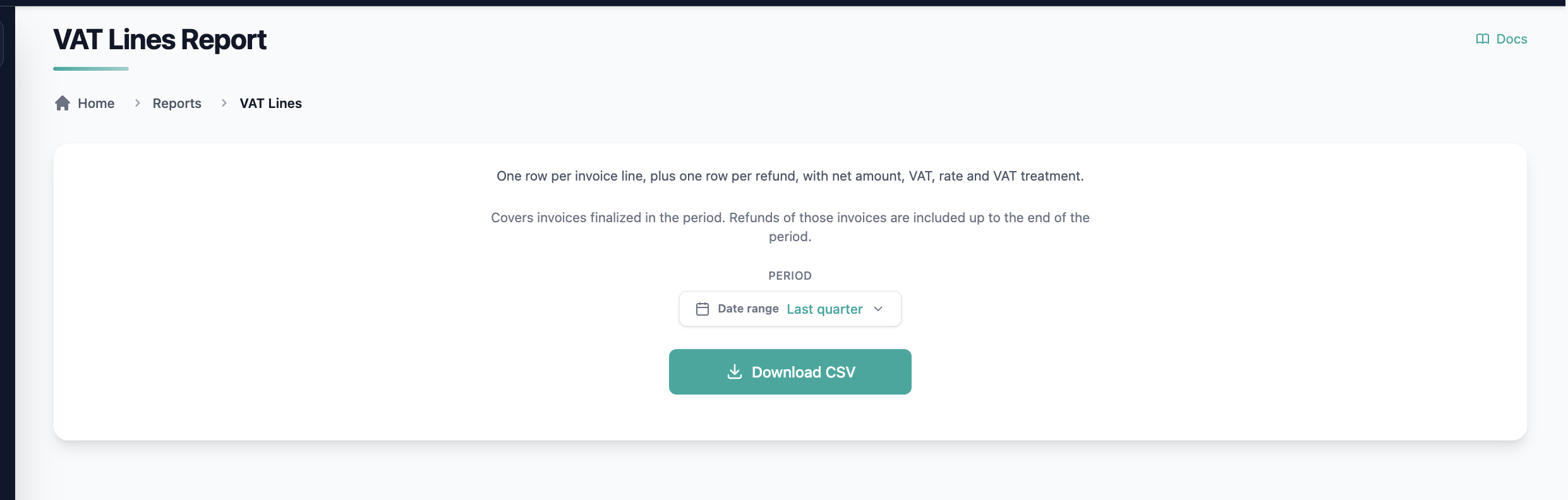
We've added a VAT Lines Report to Reports, giving EU finance teams one row per invoice line with the VAT data needed for VAT returns and month-end close.
✅ What's New:
- One row per invoice line, including each plan line of a bundled plan, with its own net amount, VAT amount, tax rate and plan line key
- B2C and B2B sales in one report, with customer type and VAT treatment on every row, and the customer's TIN (VAT ID) where one exists
- Credit notes and refunds show their own document number, are marked as credit notes, and reference the original invoice number and date so corrections land in the right period
- Date range export: the report includes documents dated within the selected start and end dates, inclusive
- Dates use the DD.MM.YYYY format and tax rates are decimals (for example
0.07) - Totals reconcile: the summed net and VAT for an invoice's rows equal the invoice's net and tax totals
🎯 Impact:
Finance teams can prepare EU VAT returns, the EU Sales List and month-end postings from a single Pelcro export instead of rebuilding line-level data by hand.
Availability Note: The VAT Lines Report is available only for sites that calculate tax with AvaTax. VAT treatment, reduced-rate and reverse-charge values come from the tax AvaTax calculates for each invoice line. The report does not change how tax is calculated and does not produce OSS or EU Sales List (ZM) filing files.
🟢 Platform: Invoice Footer Order
Custom invoice HTML blocks now render above the footer separator, so legal links stay at the bottom of the invoice.
✅ What's Improved:
- The HTML block renders directly above the separator line on invoice PDFs
- Privacy Policy and Terms of Use links are the last elements, below the separator
- Invoices without an HTML block are unchanged
🎯 Impact:
Invoice footers read in a clear, consistent order for customers.
🟢 Platform: Create Paywalls with the AI Agent
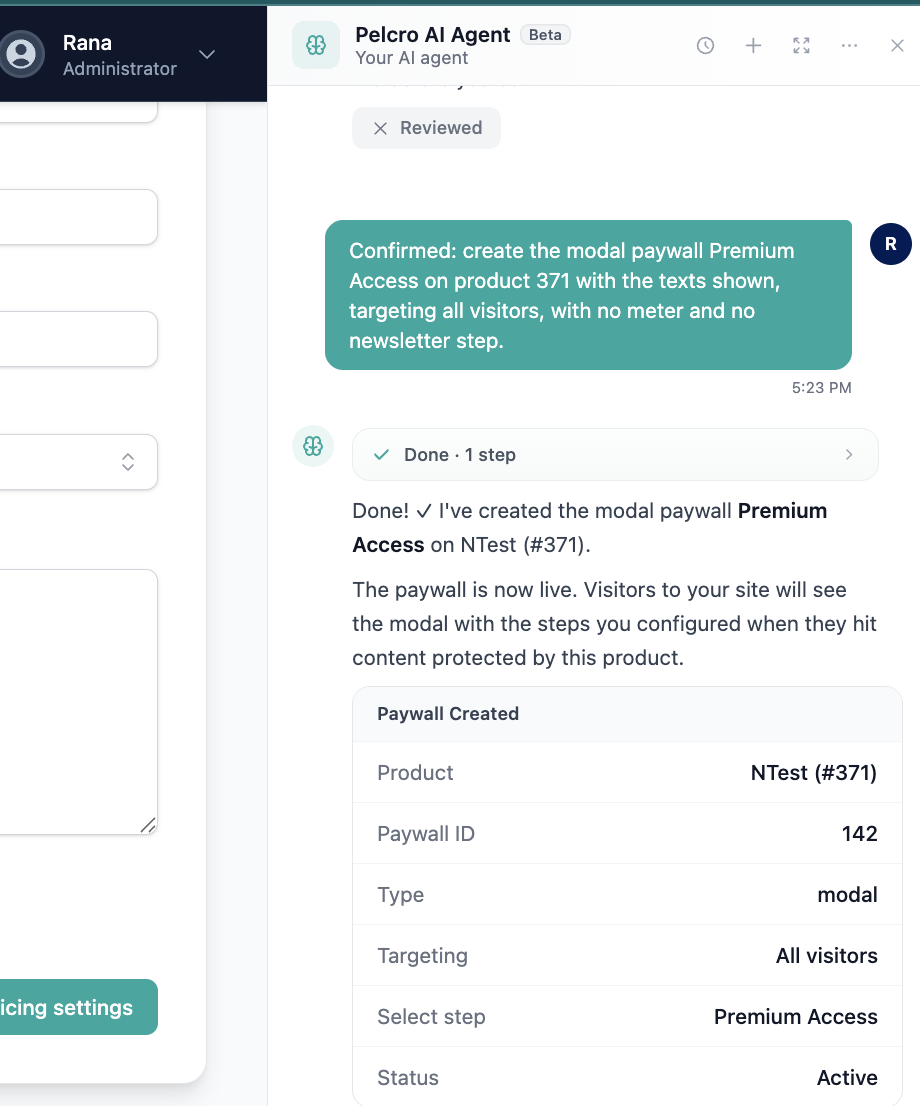
Admins can now create and configure paywalls by describing them in plain language to the AI Agent, instead of filling in the full creation form.
✅ What's New:
- Describe the paywall's settings, targeting and behavior, and the AI Agent configures them
- The AI Agent asks follow-up questions when required details are missing
- The same validation rules and permissions as the paywall creation form apply
- Paywalls created this way appear in Paywall Management, where you can review and edit them as usual
🎯 Impact:
Admins can launch a paywall in a short conversation, cutting setup time for new sites and campaigns.
🟢 Core API: Create and Update Paywalls
The Core API now supports creating and updating paywalls, with the same fields and checks as the dashboard form.
✅ What's New:
POST /products/{product_id}/paywallscreates a paywall and returns201 CreatedPUT /products/{product_id}/paywalls/{id}updates an existing paywall- Supports the paywall form's settings and targeting options, including the Referrer rule (
referrer_operator,referrer_values) - Applies the same validation and required-field checks as the dashboard, enforces site-level permissions, and returns clear validation errors
- When
target_allistrue,countries_list,platforms_listand the Referrer rule are ignored
🎯 Impact:
Integrations and AI tools can set up paywalls programmatically, and paywalls created through the API show up in Paywall Management like any other.
🟢 Platform: Referrer Targeting for Paywalls
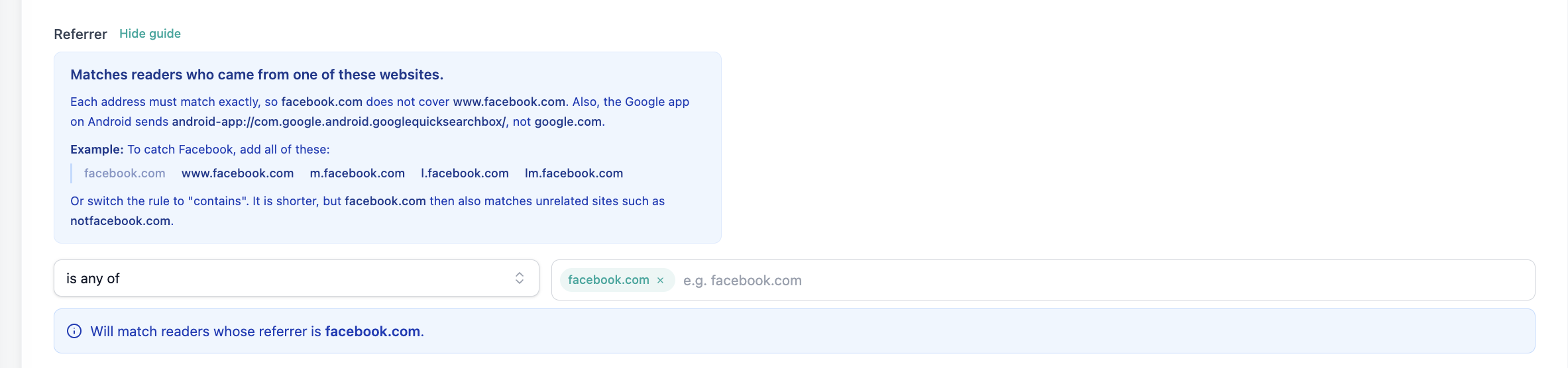
A new Referrer attribute in paywall targeting lets you show a dedicated paywall to visitors arriving from specific sites, such as search engines or social networks.
✅ What's New:
- Add one or more referring domains or URLs to a paywall's targeting
- Include or exclude the listed referrers
- Is any of matches the referring site exactly, so
google.comdoes not matchwww.google.com - Contains matches partially, so
google.comcoverswww.google.comand other Google subdomains - Visitors assigned to a referral paywall keep that paywall on later pages and return visits
- Works alongside existing targeting attributes, in both the dashboard and the Core API
🎯 Impact:
Publishers can give referred traffic its own meter, messaging and offers while direct readers keep their current experience.
🟢 Platform: Guided Site Activation in the AI Agent
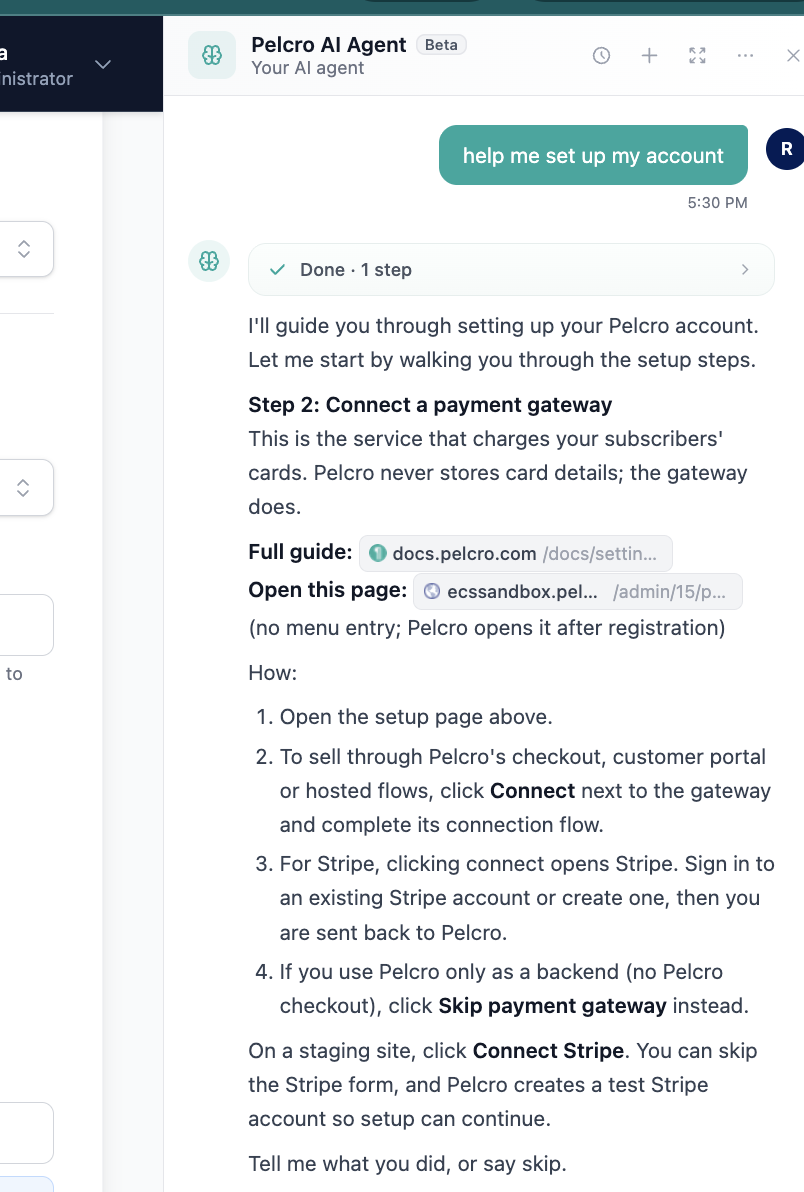
The AI Agent now walks new admins through site activation step by step, using the latest setup documentation.
✅ What's New:
- Clear activation steps: upload your logo, add your site name, create products, set up a paywall and install the script
- Each step includes a direct link to the matching documentation section
- Answers onboarding questions conversationally, based on current documentation
🎯 Impact:
New publishers reach a working site faster, with fewer support requests during onboarding.
🟢 Platform: Logo Upload and System Email Fixes
Your logo upload now lives with your other branding, and system emails display it correctly.
✅ What's Improved:
- The logo upload is now on Settings → Design, next to your brand colours. Site Settings no longer has a logo field
- A new logo saves reliably and appears on the Design page, in the customer UI and in Email Center emails
- System emails show your logo once, in the header
- The system email background and body card are now white, so logos with a white background display cleanly
🎯 Impact:
Publishers get correctly branded screens and emails on the first try, without editing templates.
🟢 Platform: Urgent Ticket Rules and Email Alerts
Ticket Center can now mark new tickets Urgent automatically and email your whole team when one arrives.
✅ What's New:
- New "What makes a ticket urgent?" field in Ticket Center settings, where you describe your rule in plain words, for example "anything about outages, refunds or login problems"
- When a ticket arrives, AI reads it against your instructions in the background and marks it Urgent when it matches
- Without instructions, a default rule applies: tickets whose subject contains "urgent" or "priority" are marked Urgent right away. Your instructions replace the default rule, so include "anything marked urgent" if you want to keep it
- Tickets are created with no delay, and a priority already set by an agent is always kept
- If the AI check fails, the ticket keeps its priority and is never blocked
- New "Email all collaborators when a ticket is urgent" toggle (off by default). When a ticket becomes Urgent, each active collaborator gets one email with the subject, description, sender, priority and a link to the ticket
🎯 Impact:
Urgent requests stand out the moment they arrive, using rules that match how your customers write, and teams can respond without watching the Ticket Center.
🟢 Platform: AI Agent Accuracy and Larger Uploads
The AI Agent now reports only the changes it actually applied and accepts larger files.
✅ What's Improved:
- The AI Agent reports success only for changes visible in Pelcro. A field the system did not update is reported as not applied
- When any change is not applied or fails, the first sentence of the reply says so and lists the affected record IDs
- Requests that include fields an endpoint does not accept are stopped before anything is sent, and the agent lists the accepted fields
- Applied, not applied and failed counts in the reply match the actual result
- AI Agent chat now accepts files up to 64 MB (previously 25 MB). Larger files show "Maximum size is 64 MB"
🎯 Impact:
Admins can trust what the AI Agent reports and process larger documents without workarounds.
🟢 Platform: General Delivery Rules for Vendors
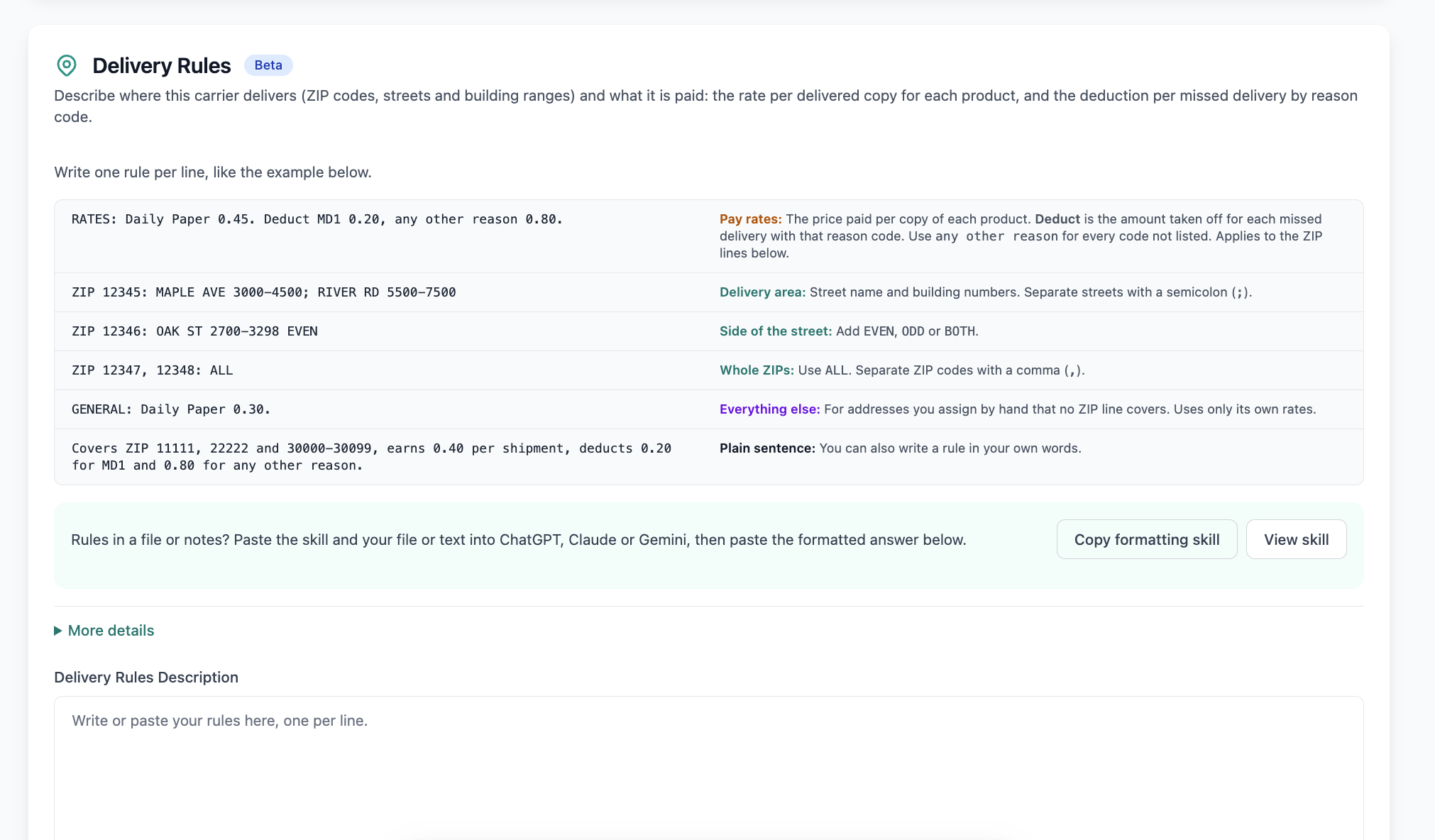
Vendor delivery rules now support general rules alongside area rules, so every address assigned to a vendor follows a defined rule.
✅ What's New:
- Write rules in plain text. Pelcro splits them into area rules (streets, street sides, ZIP codes) and general rules (everything else)
- General rules apply per vendor and cover addresses assigned to that vendor that no area rule covers, including hand-assigned addresses
- Manual vendor assignments are kept and are never overridden by rules
- Preview rules labels general rules and shows which subscriptions they affect
- Addresses with no matching rule are flagged "No delivery rule" and their shipments are billed at $0.00 with no deduction. Carrier bill lines show the reason
- Rules are numbered per vendor
- Simpler Delivery Rules help: one annotated example covers pay rates, delivery areas, street sides (
EVEN,ODD,BOTH), whole ZIPs (ALL), general rules (GENERAL) and plain sentences, with less common rules under More details - General rules can be created, read and updated through the Core API using a two-step preview, then confirm and save flow
🎯 Impact:
Print publishers can route and price every carrier address correctly, with less manual cleanup before each bill.
🟢 Platform: Scheduled Phases on Shipment-Based Subscriptions
Shipment-based print subscriptions, which renew or expire when shipments remaining reaches 0, now support scheduled phases.
✅ What's Improved:
- You can now add a phase to a shipment-based subscription that has no current period end date
- When shipments remaining reaches 0, a scheduled renewal phase activates, the same as for auto-renewing subscriptions
🎯 Impact:
Publishers can plan price or plan changes on shipment-based subscriptions without workarounds.
🟢 Platform: Toll-Free Numbers for IVR
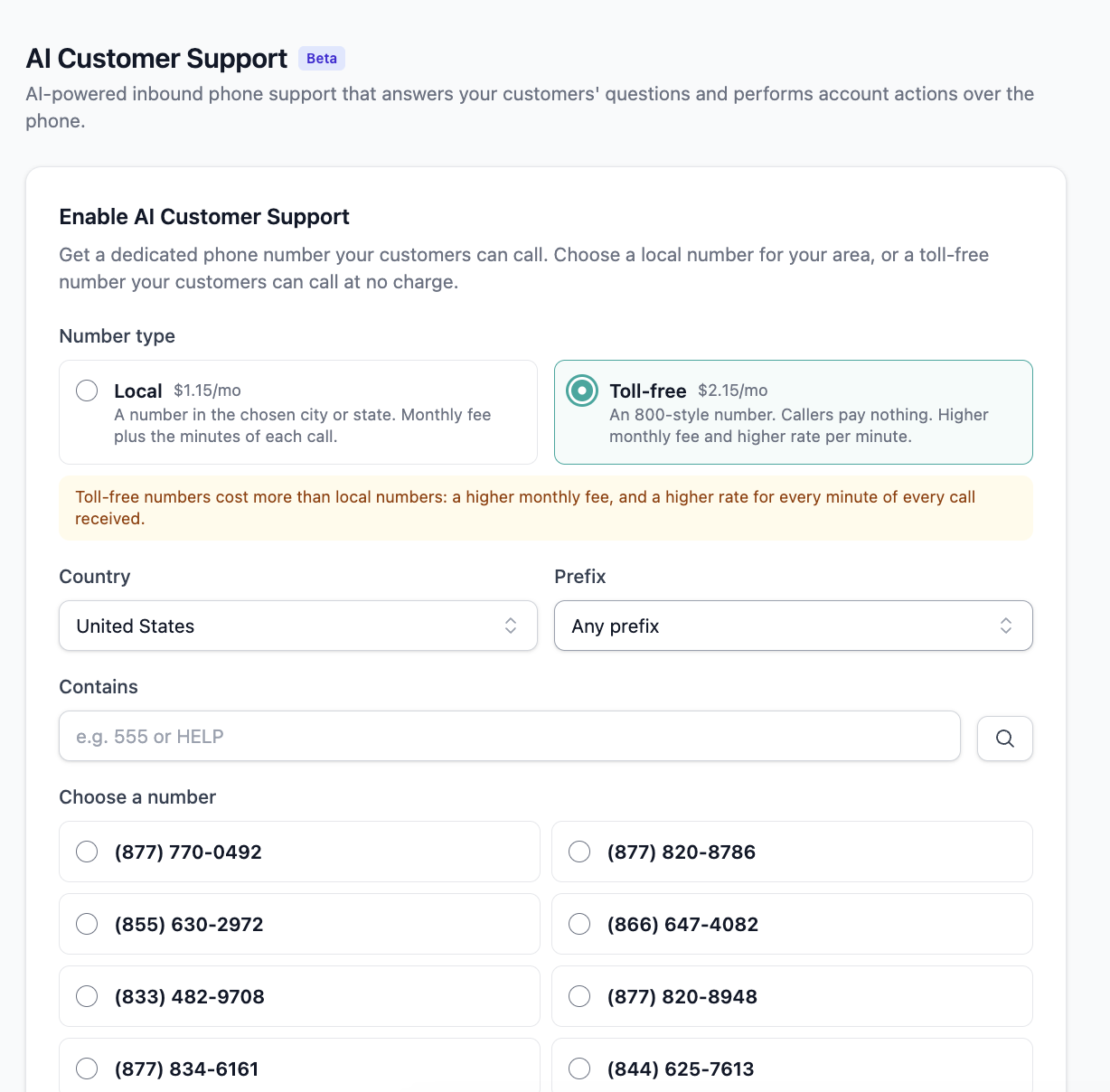
Publishers can now use toll-free phone numbers for their Pelcro IVR.
✅ What's New:
- You can now use an eligible toll-free number under Settings > AI customer support
- Calls to a toll-free number route to the correct IVR flow, including menu navigation and call transfers where supported
- Test toll-free numbers in staging before activating them in production
- Existing local numbers are unaffected
🎯 Impact:
Publishers can now use toll-free numbers when moving support calls to Pelcro.
🟢 Platform: Pin Your Site to the Newest UI Version
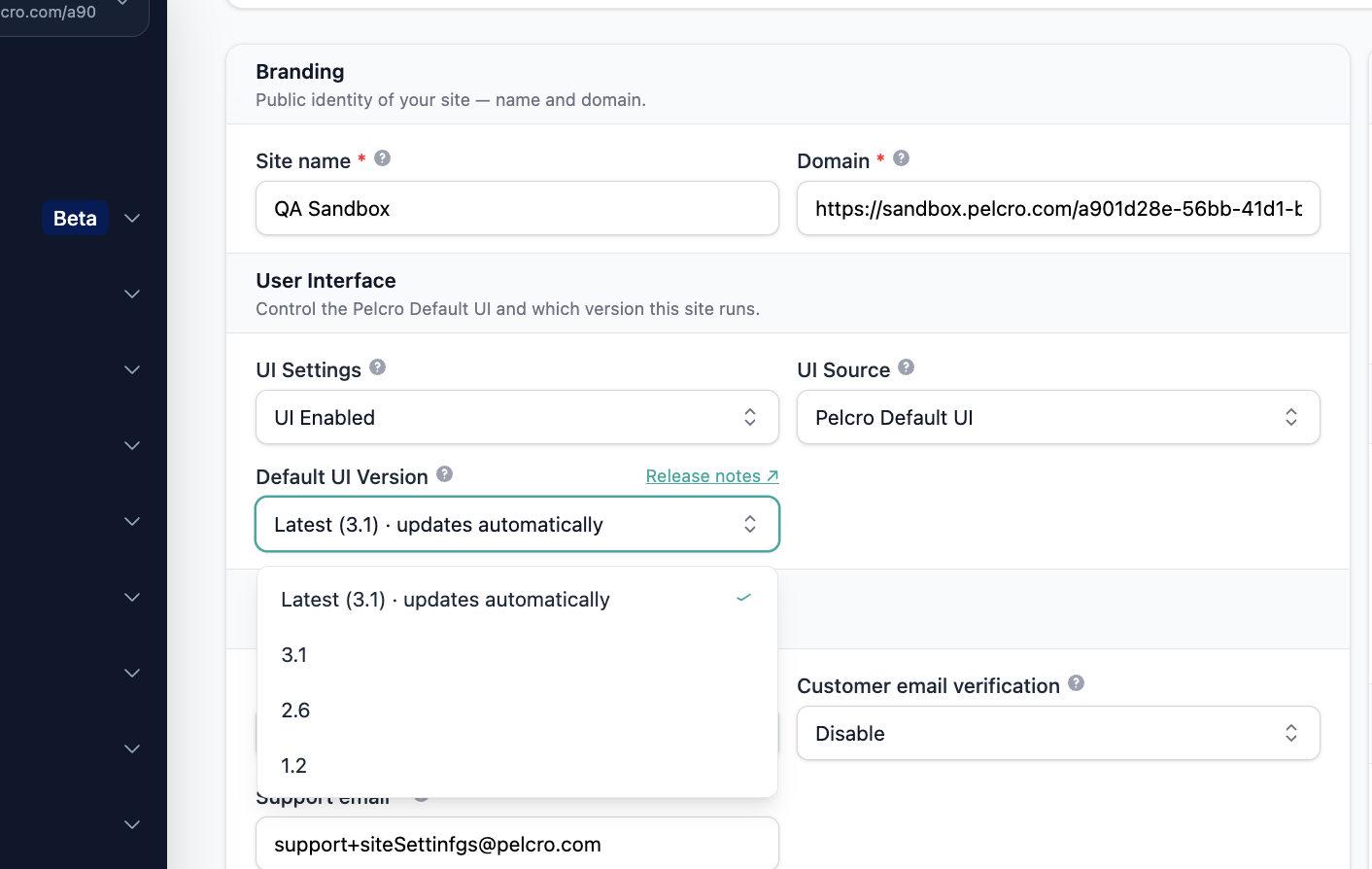
The Default UI Version setting now lets you pin your site to the newest release without opting into automatic upgrades.
✅ What's New:
- The dropdown lists the newest release as its own option, next to Latest
- A site pinned to a version stays on it when newer versions are released, and still receives fixes for that version
- Latest works as before and moves to each new version automatically
- New versions appear in the dropdown automatically
- The site settings API accepts and returns a specific version or
latestfordefault_ui_version
🎯 Impact:
Site admins get current features while keeping control over when their site moves to a new UI version.
🟢 Platform: Faster Customer Pages in the Dashboard
We've improved the performance of the two most-used admin pages in the dashboard.
✅ What's Improved:
- Faster loading of the customer detail page
- Faster customer search results
🎯 Impact:
Support and operations teams spend less time waiting on the pages they use most.
🟢 Platform: XRechnung Buyer Reference Fallback
XRechnung e-invoices now always include a BuyerReference, even when the customer has not provided a Leitweg-ID.
✅ What's Improved:
- When a Leitweg-ID is available, it populates the BuyerReference field in the XRechnung XML
- When the Leitweg-ID is empty or missing, BuyerReference is set to
{customer_id}-{invoice_id} - The fallback no longer depends on a purchase order number, which individual and B2B customers often leave blank
🎯 Impact:
B2B customers receive compliant e-invoices they can use for bookkeeping, without extra input at checkout.