

Release 3.3 (Tech Release 1.27)
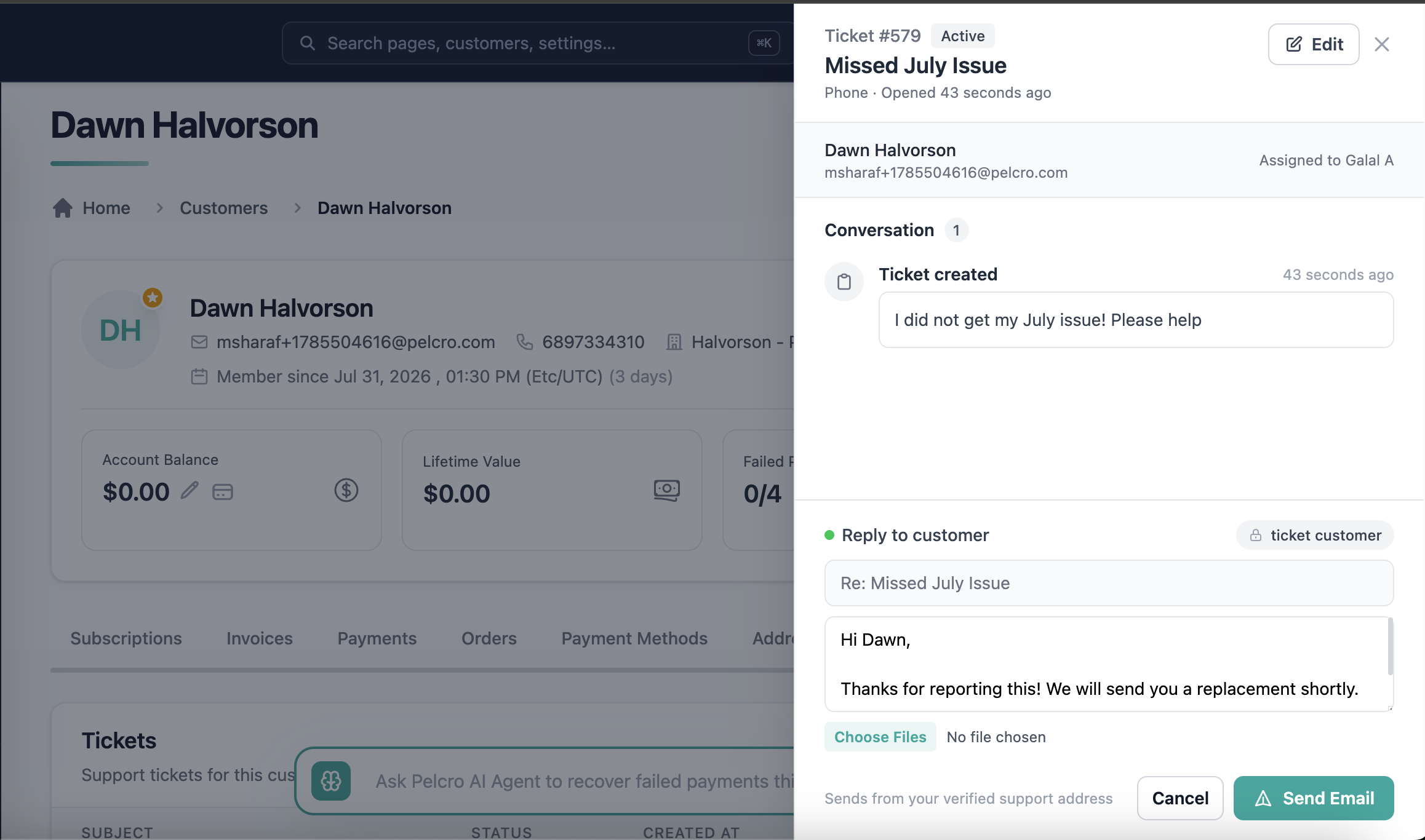
🟢 Platform: Two-Way Email Communication on Tickets
Support teams can now send and track customer emails directly from tickets, keeping every conversation in one place instead of relying on external email tools.
✅ What's New:
- Added a "Send email to customer" option to the Create Ticket drawer, with subject and message fields
- Ticket creation and the outbound email now happen in a single action
- Introduced a Ticket Details drawer with a chronological conversation timeline covering ticket creation and all customer emails
- Agents can send follow-up emails directly from the Ticket Details drawer, with delivery status (Sent/Failed) shown per message
- Each site can verify its own sending domain in Settings → Support, so ticket emails send from the client's own domain rather than a shared one
- Domain verification is admin-only; agents on unverified sites see a clear inline note directing them to their admin
🎯 Impact:
Support teams get a complete, trackable communication history per ticket, and each client's email sending reputation stays isolated to their own domain.
🟢 Platform: Proactive AI Agent
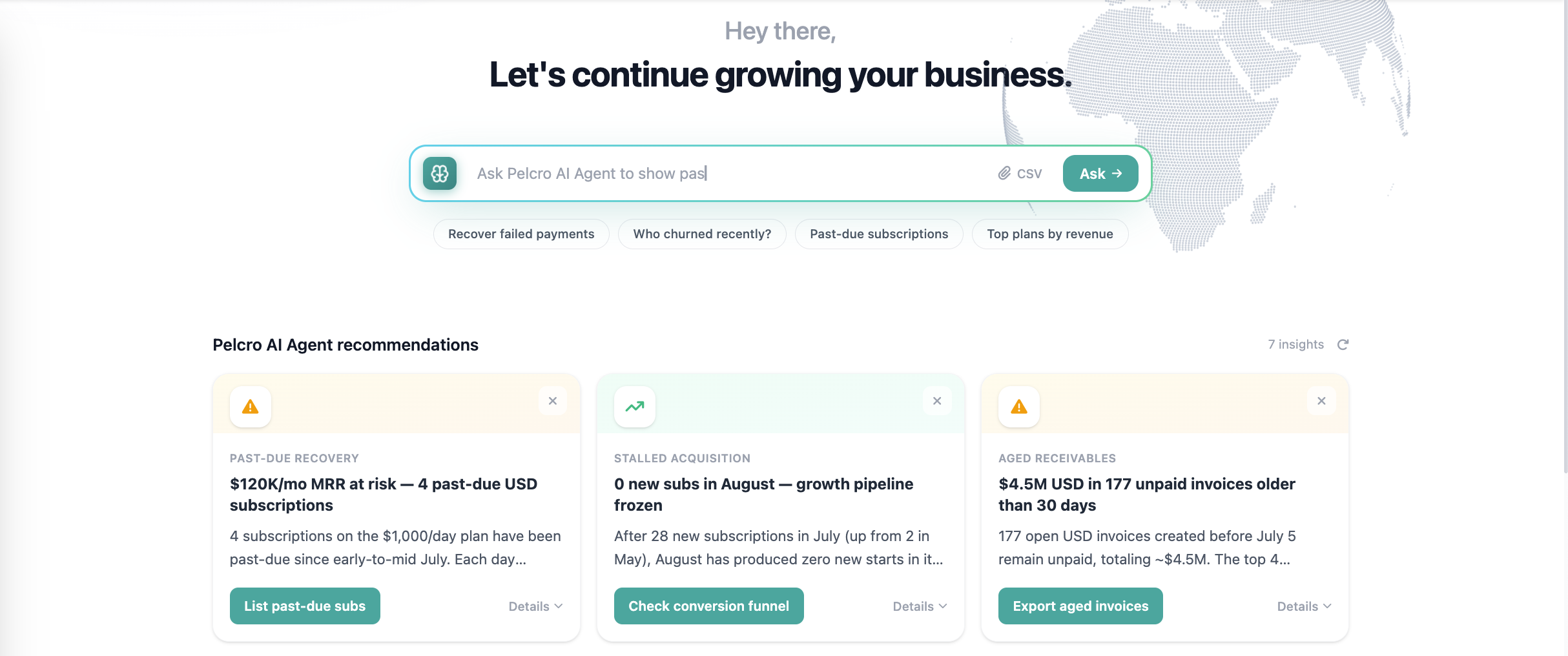
We've introduced a new AI Recommendations experience that analyzes customer activity and surfaces actionable suggestions, so admins can spot risks and opportunities without digging through dashboards.
✅ What's New:
- New AI Recommendations landing page with an "Ask AI" search bar and example prompts
- AI-generated recommendation cards covering customer activity trends, churn risk, subscription cancellations, and repeated failed payments
- Each card includes a title, insight, and suggested action, with the ability to refresh recommendations
🎯 Impact:
Admins get proactive, plain-language guidance on where to focus, reducing time spent manually reviewing analytics to catch churn and revenue risks.
🟢 Platform: Automation Filtering for Subscriptions Canceled at Period End
We've improved automation targeting so that subscriptions already scheduled to cancel at the end of their term are no longer swept into renewal or price-increase campaigns.
✅ What's New:
- Filter works reliably regardless of daily-changing expiry dates, removing the need for manual date-based workarounds
- Added a new filter for lists and segments to include or exclude subscriptions that are scheduled to cancel at period end, even while still marked Active
🎯 Impact:
This ensures customers who have already requested cancellation are excluded from renewal and pricing automations, reducing confusing or unwanted communications and manual support intervention.
🟢 Platform: Per-Issue Fulfillment Price in Lists Exports
List exports now include an allocated per-item value for fulfilled subscription issues, supporting customs and compliance requirements for physical shipments.
✅ What's New:
- Added a new issue_price column to lists exports, calculated as the subscription's paid amount divided by remaining shipments
- Calculation supports a range of subscription durations and pricing structures
- Per-item values are available across shipment data and fulfillment reporting
🎯 Impact:
Publishers shipping physical subscriptions can now provide accurate declared values per shipment, supporting customs documentation and audit compliance without manual calculation.
🟢 Platform: Enhanced Accounting Reports UI
The Accounting Reports section of the Reports Hub has been redesigned for easier discovery and more accurate usage tracking.
✅ What's New:
- Replaced the single tab-based Accounting Reports view with individual report cards in the Reports Hub
- Each report now opens on its own dedicated page with a unique URL
- Layout is aligned with the existing Renewal Summary Report for a consistent experience
- Each report page can now be tracked independently for usage analytics
🎯 Impact:
Users can find and access individual reports faster, while the team gains accurate, report-level usage insight to guide future improvements.