

Release 3.0 (Tech Release 1.24)
🟢 Platform: Event-Based Segmentation
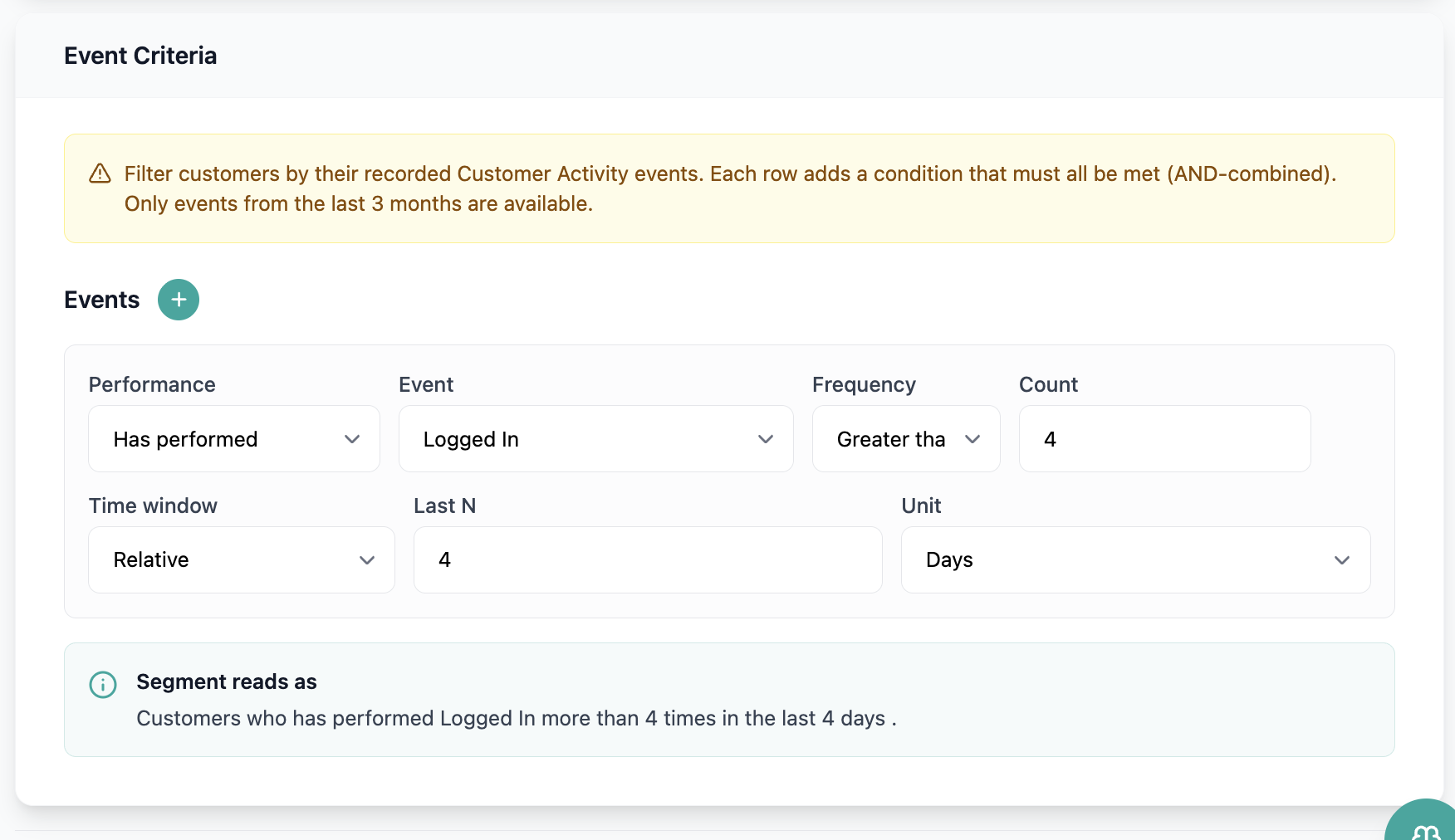
Segment builder now supports behavioral event criteria, allowing marketers to target customers based on actions captured in the Customer Activity event catalog — not just account attributes.
✅ WHAT'S NEW
- New "Event Criteria" section in the segment builder (available when the segment object is "Customers"), matching the visual pattern of existing criteria sections.
- Each event filter row supports: Performance (has / has not performed), Event Name (from the live events registry), Frequency (between, greater than, less than, exactly), and Time Window (exact date range or relative window).
- Multiple event criteria rows are AND-combined, consistent with existing segment behavior.
- Segments with event criteria support Preview (CSV export), Reuse (pre-populated rows), and dynamic re-evaluation when used in Automations campaigns.
🎯 Impact: Marketing teams can now build precise behavioral audiences — such as "subscribed in the last 30 days" or "hit the paywall but never converted" — directly in the segment builder, enabling more targeted campaign triggers.
Note: Only authenticated user events are captured; anonymous events are not available in the Event Name selector.
🟢 Platform: Revenue Waterfall Report - Beta
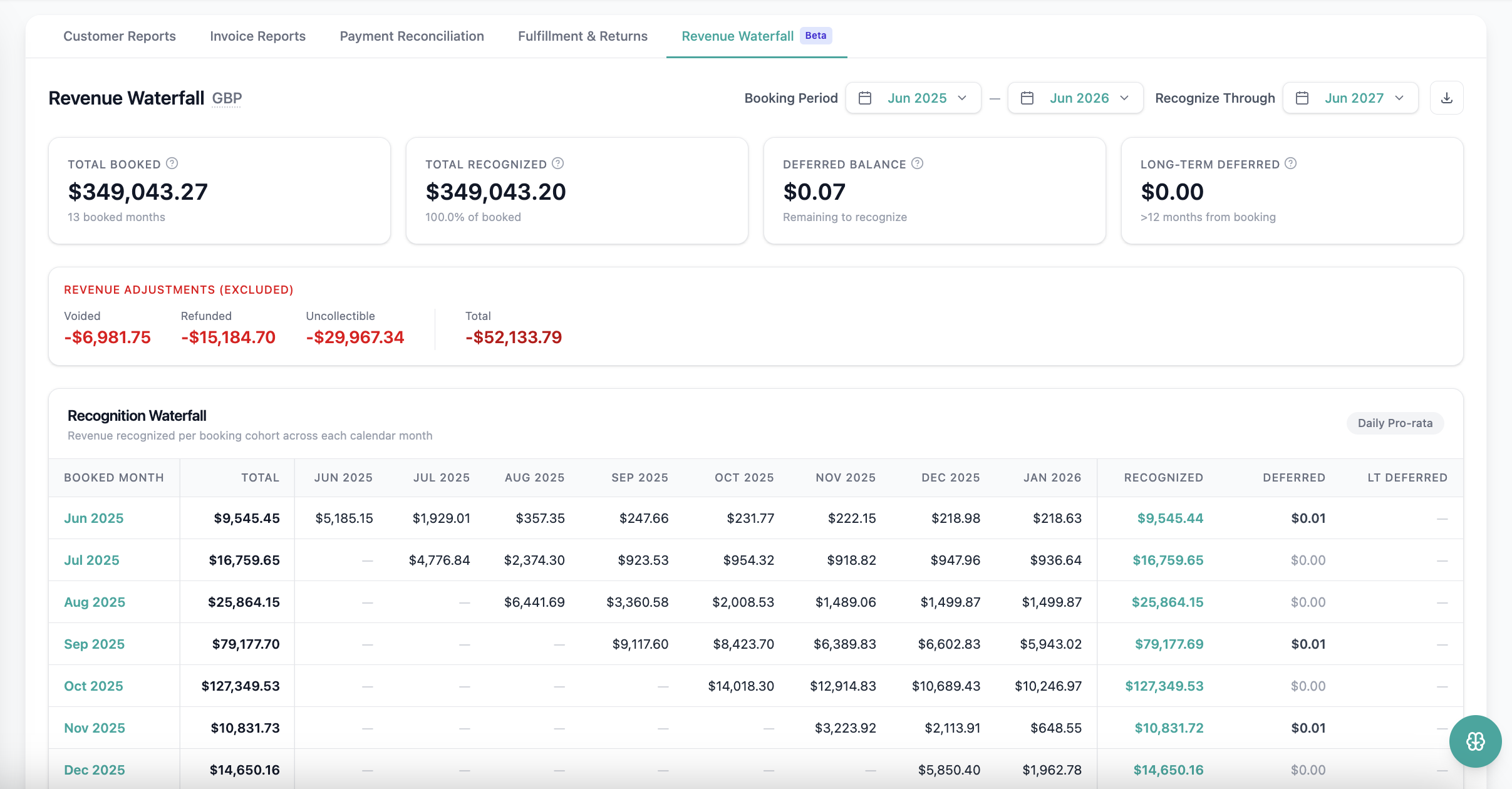
We've added a Revenue Waterfall Report that shows how already-issued invoices will be recognized as revenue across future periods.
✅ WHAT'S NEW
- Waterfall view of deferred revenue recognition built exclusively from issued invoices — no future billing projections.
- Each period displays opening deferred balance, invoiced amount, recognized revenue, and closing deferred balance.
- Revenue allocated using existing per-day or per-period recognition rules; monthly totals reconcile mathematically across periods.
- Drill-down to subscription and invoice level available.
🎯 Impact: Finance and accounting teams can now forecast and validate future revenue recognition directly in Pelcro, reducing reliance on manual reconciliation against Stripe.
🟢 Platform: MRR Metric in the Dashboard
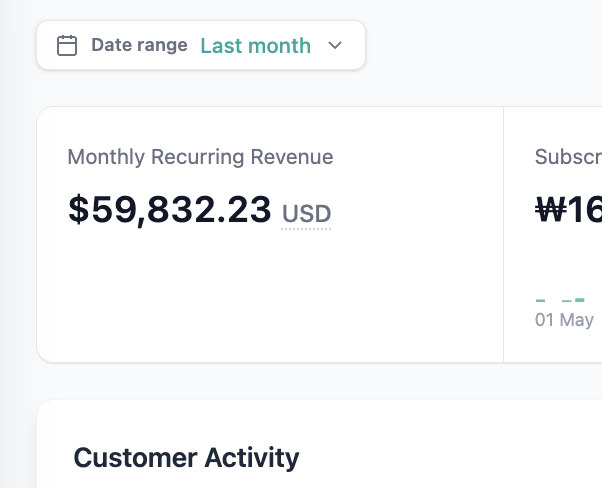
The Overview dashboard now includes a Monthly Recurring Revenue (MRR) summary card, giving you instant visibility into normalized recurring revenue.
✅ WHAT'S NEW
- New MRR card on the Overview dashboard displaying the current normalized monthly recurring value.
- All billing intervals normalized to monthly: annual plans ÷ 12, quarterly ÷ 3, daily × 30.
- Canceled, expired, incomplete, and unpaid subscriptions (outside grace period) are excluded from calculations.
- Applied discounts are reflected in the MRR value.
- Currency formatting follows the merchant's reporting currency; empty states display "$0 MRR".
- Tooltip explains the MRR definition inline.
🎯 Impact: Business operators can now track recurring revenue health at a glance without running separate reports or relying on external tools.
🟢 Platform: Persist Product & Plan in URL Flows
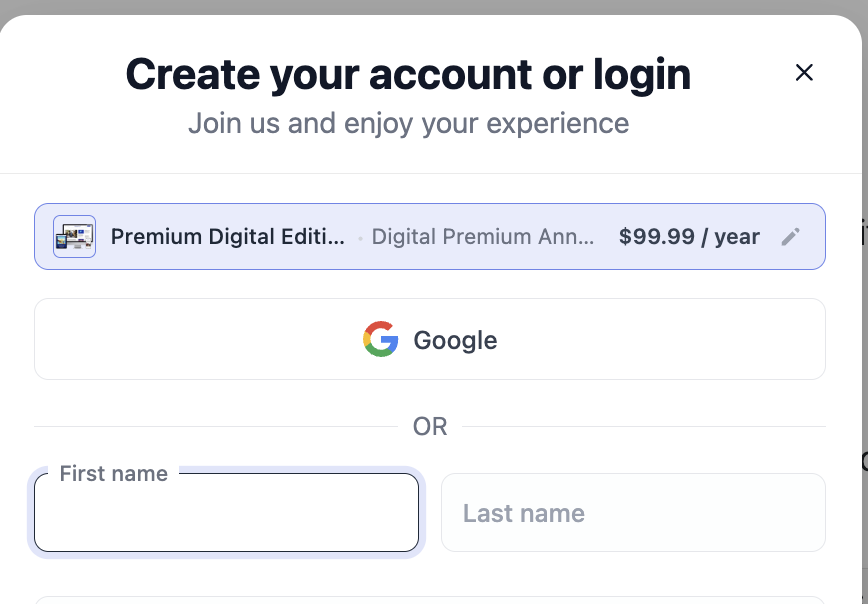
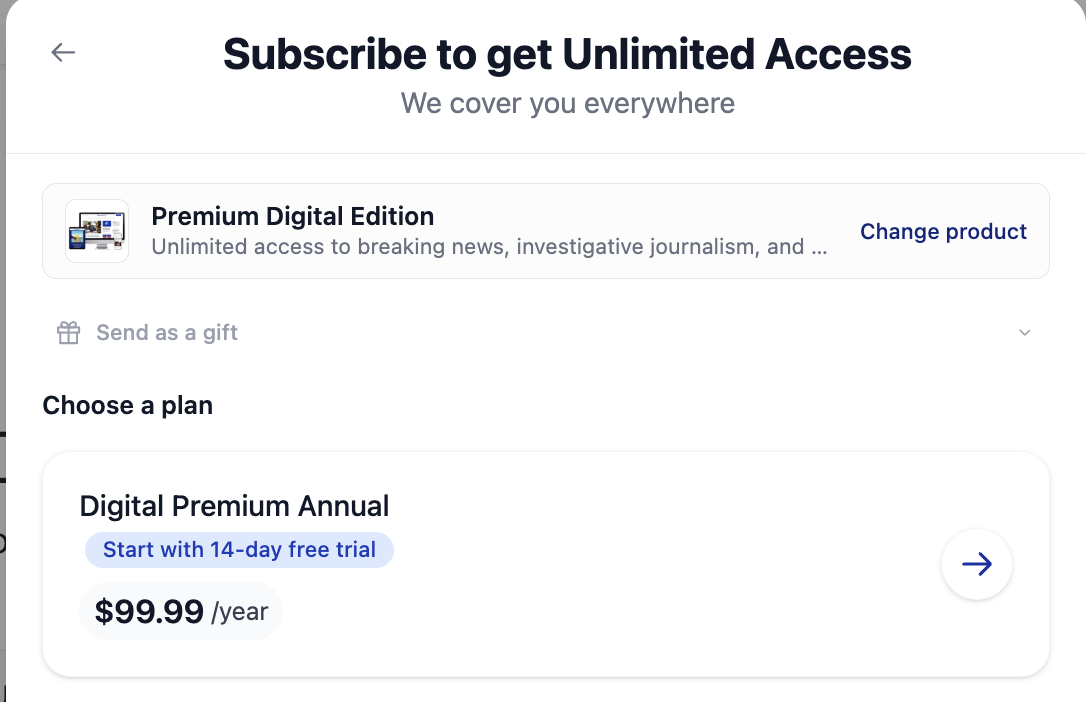
When a subscription flow is launched via URL with a preselected product and plan, the selection is now displayed consistently across all checkout steps.
✅ WHAT'S IMPROVED
- Selected product and plan are now preserved and shown in the Login, Create Account, Address, and Payment modals.
- The preselected product component is enhanced to also display the plan name when plan_id is present in the URL.
- Gift flows using is_gift=true also display the selected product and plan throughout checkout.
🎯 Impact: Subscribers entering checkout through URL triggers now have clear confirmation of what they're purchasing at every step, reducing drop-off from uncertainty during the flow.
🟢 Platform: Default User Interface Versioning
Pelcro's Default UI now supports version pinning, giving clients control over when they adopt breaking changes while giving engineering full observability into which UI version is running on any site.
✅ WHAT'S NEW
- Sites can be pinned to a specific major.minor version (e.g. v2.1); the SDK loads the versioned bundle URL automatically.
- Unpinned (legacy) sites continue loading the current bundle.js — existing behavior preserved.
- New sites are seeded to the latest stable version on creation.
- Patch releases roll automatically within a pinned major.minor; minor/major upgrades require a manual re-pin.
- Every API request from the Default UI now carries an X-Pelcro-UI-Version header, captured in OpenSearch for adoption and incident analysis.
🎯 Impact: Clients can upgrade the Default UI on their own schedule and validate changes before they reach end users, reducing unplanned production breakage from platform deployments.
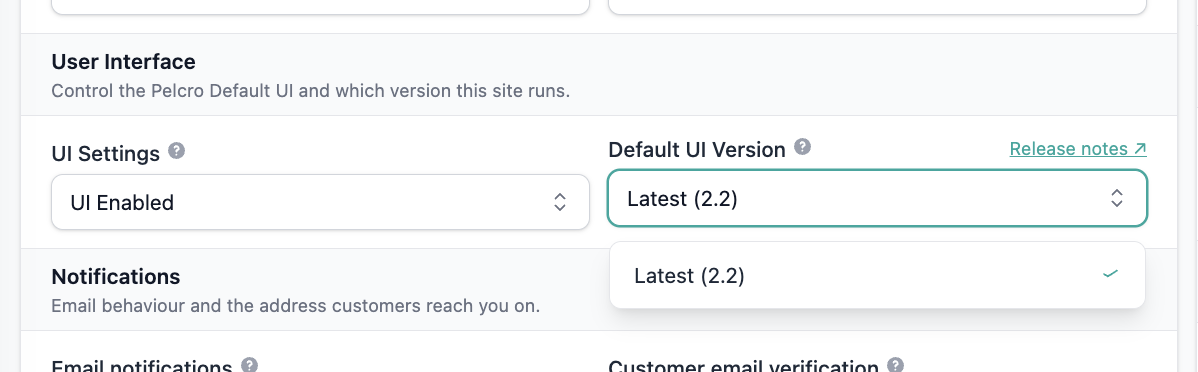
Note: The Default user interface changelog is now published here to track the updates https://docs.pelcro.com/update/docs/ui-changelog
🟢 Platform: Google Sign-In
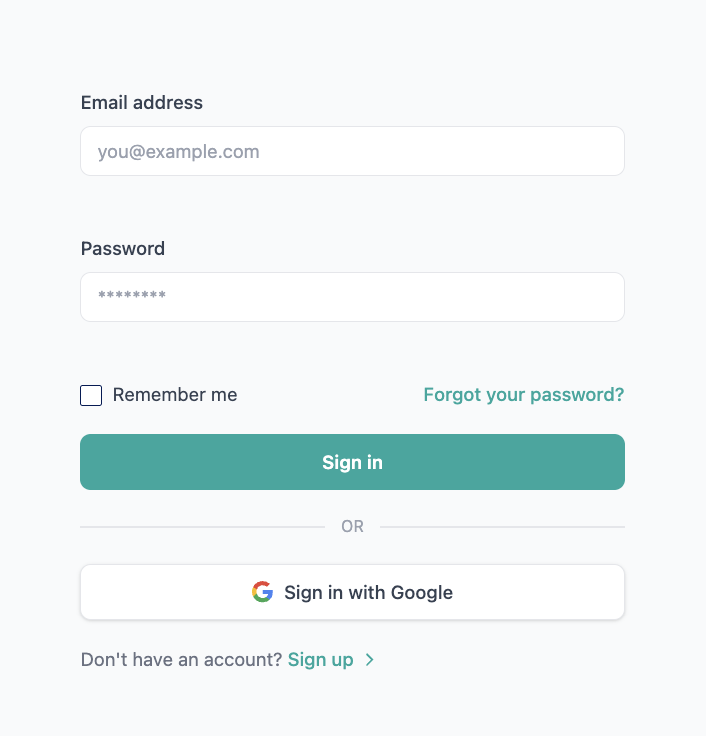
You can now sign in or register using your Google account, eliminating the need to manage a separate Pelcro password.
✅ WHAT'S NEW
- "Sign in/up with Google" button available on the Pelcro login screen.
- For existing accounts: Google identity is linked to the matching email — no duplicate account created.
- For new accounts: a Pelcro user is provisioned automatically using the verified Google email, first name, and last name.
🎯 Impact: Reduced sign-in friction and fewer password-reset support requests for clients using the Default UI login flow.
🟢 Webhooks: Owner Info Added to Member Webhooks
The member.created and member.activated webhook payloads now include organization owner details to support downstream transactional email workflows.
✅ WHAT'S NEW
- Owner first name, last name, and email are now included in both member.created and member.activated payloads.
🎯 Impact: Downstream integrations — such as transactional email platforms — can now personalize member communications with accurate owner information without additional API lookups.
🟢 Platform: Shipping Address & Description Added to Ticket Exports
Ticket exports now include ticket description and customer shipping address columns, providing complete ticket context directly in the exported file.
✅ WHAT'S NEW
- New Ticket Description column added to ticket exports.
- New Customer Shipping Address column added, populated from the customer's default shipping address.
- Both columns are appended to the end of the export file; existing format and fields are unchanged.
🎯 Impact: Support and operations teams can now review full ticket details and customer shipping information from the export, without opening individual tickets in the platform.
🟢 Platform: Billing Name in Refunds Export
The refunds export now correctly sources the customer name from the billing address, alongside the existing customer object name field.
✅ WHAT'S IMPROVED
- Billing address name is added as a separate column in the refunds export.
- Both the customer object name and the billing address name are included — appended to the end of the export file.
- Refund records without a billing address name display a blank/null value without breaking the export.
🎯 Impact: Finance teams can now reconcile refunds against the correct billing entity, resolving cases where the shipping address contact was incorrectly used.
🟢 Platform: Gift Message Field in List Exports
The list export — the primary export used for shipment creation — now includes the gift message field, making gifting information accessible during the fulfillment workflow.
✅ WHAT'S NEW
- Gift message field added to the list export, appended to the end of the file.
- Non-gift orders display a blank/null value — no export errors on empty gift messages.
🎯 Impact: Operations teams no longer need to cross-reference the fulfillment export to retrieve gift messages during shipment preparation.
🟢 Open API: Customer-Facing MCP Tools
Pelcro's Open API is now available over the Model Context Protocol (MCP), letting AI agents act on behalf of a signed-in subscriber to manage their own subscriptions, addresses, and profile. Served at https://mcp.pelcro.com/open, it covers customer, subscription self-service (change, cancel, reactivate), and address tools, plus a discovery pattern (open_api_discover / open_api_call) for reaching additional curated endpoints. Public tools need no authentication; the rest run under the subscriber's own token. Connect from Claude, Cursor, VS Code, Windsurf, ChatGPT, or any MCP client supporting remote servers over Streamable HTTP.